
 Written by
 This is a variation on webpragmatists original "Assigned To" MOD as seen on the osTicket forum.
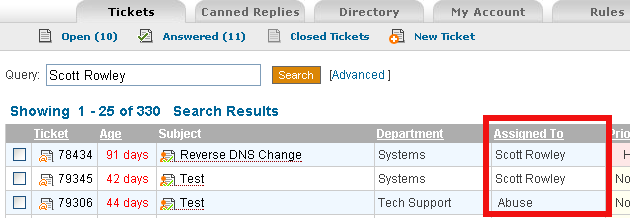
The following is what I have for all of my entries. I will include one line prior to the code so you can search for where to enter it.
include/staff/tickets.inc.php
(Remember to comment out the original sortOptions)
//I admit this crap sucks…but who cares??
$sortOptions=array('date'=>'ticket.created','ID'=> 'ticketID','pri'=>'priority_urgency','dept'=>'dept_name','ass'=>'firstname');
//$sortOptions=array('date'=>'ticket.created','ID'=>'ticketID','pri'=>'priority_urgency','dept'=>'dept_name');
(Remember to comment out the first entry for qselect and qfrom)
$pagelimit=$pagelimit?$pagelimit:PAGE_LIMIT; //true default…if all fails.
$page=($_GET['p'] && is_numeric($_GET['p']))?$_GET['p']:1;
$qselect = 'SELECT DISTINCT ticket.ticket_id,lock_id,ticketID,ticket.dept_id,ticket.staff_id,subject,name,ticket.email,dept_name,staff.firstname,staff.lastname '.
',ticket.status,ticket.source,isoverdue,ticket.created,pri.*,count(attach.attach_id) as attachments ';
$qfrom=' FROM '.TICKET_TABLE.' ticket LEFT JOIN '.DEPT_TABLE.' dept ON ticket.dept_id=dept.dept_id '.
// ' LEFT JOIN '.TICKET_PRIORITY_TABLE.' pri ON ticket.priority_id=pri.priority_id '.
// ' LEFT JOIN '.TICKET_LOCK_TABLE.' tlock ON ticket.ticket_id=tlock.ticket_id AND tlock.expire>NOW() '.
' LEFT JOIN '.STAFF_TABLE.' staff ON ticket.staff_id=staff.staff_id';
<a href="tickets.php?sort=dept&order=<?=$negorder?><?=$qstr?>" title="Sort By Category <?=$negorder?>">Department</a></th>
<th width="150" ><a href="tickets.php?sort=ass&order=<?=$negorder?><?=$qstr?>" title="Sort By Assignee <?=$negorder?>">Assigned To</a></th>
<td nowrap><?=Format::truncate($row['dept_name'],30)?></td> <td nowrap><?=($row['firstname']) ? $row['firstname'] : ' ';?> <?=($row['lastname']) ? $row['lastname'] : '';?></td>
You should now be able to refresh your Ticket page and have a nice "Assigned To" column. Give it a go!
Now you may notice that after you close a ticket that is assigned to someone that assignment gets removed. I have found this undesirable so we’ll edit the following
include/class.ticket.php
remove staff_id=0 from the following line:
$sql= 'UPDATE '.TICKET_TABLE.' SET status='.db_input('closed').',isoverdue=0,duedate=NULL,updated=NOW(),closed=NOW() '.
This will still make the ticket show up under "My Tickets" (even when closed) in order to get it to stop doing that (if you desire), then change the following entry from:
include/staff/tickets.inc.php
$qwhere.=' AND ticket.staff_id='.db_input($staffId);
to:
$qwhere.=' AND ticket.status="open" AND ticket.staff_id='.db_input($staffId);
You’ll also need to change the following (otherwise it will count that you have tickets assigned but won’t list them thus confusing everyone).
scp/tickets.php
'LEFT JOIN '.TICKET_TABLE.' assigned ON assigned.ticket_id=ticket.ticket_id AND assigned.staff_id='.db_input($thisuser->getId());
To:
'LEFT JOIN '.TICKET_TABLE.' assigned ON assigned.ticket_id=ticket.ticket_id AND ticket.status=\'open\' AND assigned.staff_id='.db_input($thisuser->getId());
The last line posted has an error:
‘LEFT JOIN ‘.TICKET_TABLE.’ assigned ON assigned.ticket_id=ticket.ticket_id AND open.status=’Open’ AND assigned.staff_d=’.db_input($thisuser->getId());
The good one shoud look like this:
‘LEFT JOIN ‘.TICKET_TABLE.’ assigned ON assigned.ticket_id=ticket.ticket_id AND open.status=’Open’ AND assigned.staff_id=’.db_input($thisuser->getId());
the mistake is by omission i think, but it generates an recursive error.
I am not an code specialist.
Tanks for all your efforts.
Updated my code! Nice catch, thanks!
Code has been completely gone through and the article re-written. Everything is tested and fully functional under 1.6ST, if I have time tomorrow or later this week I will do the same for 1.6RC5 but I think it should work already right now.
Many thanks on this Scott. I applied it to 1.6ST…so far so good. Much needed feature for operational control. Kudos…
Thanks very much! Glad its working for you!
Still on OSTicket. Do you know of a way to extract the tickets to a csv or Excel for further processing outside of the application (i.e. for reporting purposes)? Again many thanks.
What all would you like to see in this csv? You could do something like the following:
SELECT ticket_id,dept_id,staff_id,name,subject,created INTO OUTFILE ‘/tmp/result.csv’ FROM ost_ticket WHERE 1;
Make sure where you write the file to is writable.
But keep in mind your dept_id and staff_id will be the numbers not the actual names (I’m not awesome at mysql so I could get that with a larger query but not in a single line.) I could probably script it and come up with it as I do that in the report page I’m building.
Basically the extracted data is used as a basis for reporting/analysis. For example, finding out how productive each of the staff is, or which department does the most work, or classifying the types of ticket based on help topic, finding out the rate of open ticket raised daily, closed ticket daily, average days for tickets to be closed, etc.
I am hoping that there is an extension or modification readily available from which I can ‘click to export’ the basic ticket data for further analysis as above.
Another problem I have is that the previous guy who installed the OSTicket left the company and nobody seems to know the database password. So, I can’t do a direct database query.
Ok, I’m actually working on a report page now and I can add that ability to it as well but this may be awhile before I’ve got it finished. Once I have it done I’ll post up a new page on the site and let you know (from here).
Many thanks Scott.
$sql= ‘UPDATE ‘.TICKET_TABLE.’ SET status=’.db_input(‘closed’).’,isoverdue=0,duedate=”NULL”,updated=NOW(),closed=NOW() ‘.
this is big problem : duedate=”NULL” -> duedate=NULL
Yes, you are correct — though it hasn’t caused any issue for me or anyone thats used my MOD so far (that they’ve reported). I will update the code. Thanks.
Thanks a lot!!
Hi
I addedthis MOD, the COlumns all display beautifully, however, I can no longer close Jobs. I have no idea why. It has the error Problems closing the ticket. Try again,
and I get an email with the DB error,
[UPDATE ost_ticket SET status=’closed’,isoverdue=0,duedate=”NULL”,updated=NOW(),closed=NOW() WHERE ticket_id=24]
Incorrect datetime value: ‘NULL’ for column ‘duedate’ at row 1
Any idea would be great.
Thanks
Ryan, please see the comment 2 above yours by “tm”. That should get you fixed.
Thanks Scott. That sorted it out.
After Integrating mod “Assigned To” at 1.6st, getting below issue:
Issue: assigned to tickets not visible by members of same department and by member of other department thos having access at tickets of this department.
detail:
case1: staff1 fo dept1 assign ticket1 to himself and staff2 of same department dept2 can can see this assigned ticket1 by his account neither in open nor in answered ticket.
case2: staff3 of another department dept3 can not see assigned ticket1 to staff1 also while staff3 can access all open tickets of dept1.
please let me know how to solve this.
Uhhhh, you lost me there.
FWIW, this MOD doesn’t do anything with department/staff permissions, everyone should still be able to see whatever other tickets they were previously allowed to see. Could it be something with groups?
Admin Panel> Staff> Users groups> Select a group> Dept. Access
I checked it again.
department access is well set in my setup of osticket.
one more input bleow:
if i unassign the ticket then same department member or other department member can access this ticket.
but once it is assigned, then assigned ticket is not accessed by other staff(same or other department)
Resolved by enabling setting below setting:
Assigned Tickets:Show assigned tickets on open queue.
Answered Tickets: Show answered tickets on open queue. ”
But ideally answered and assigned ticket should be visible other own department member or other members those are able to access this department.
Hi Scott,
after Reports, I’ve installed this MOD too and it’s just amazing!
Thanks for it!
rash*
😀 No problem!
Have some one tried to make a dashboard out from this amazing ticketing system ? i m planning to use google API’s to create 2 pie charts and 2 bar graphs on how many tickets are totally available and how many are opened/closed and how many handled by which support staff ‘on the fly’.. i plan to put this alone in our company’s monitor so that all of the support staffs are on fire to close cases and reach numbers.LOL its fun..
btw, @Scott Rowley i liked the age table on your screenshot,small idea but excellent one.
@all: Have any tried to integrate this support ticketing system to joomla ? i wish to make this ticketing system as a conact form for my joomla site, so that the enquiries are not missed. Thanks all.
Scott,
Thanks a Lot…..-:)
why it should be so f*** difficult to add your own fields to support ticket form ?
they should give basic ticket handling and data forms and writing it to database should be easy so that people can add own support data like — make/ model/ person reporting/ company/ department whatever.
Excellent Mod you saved my life after embarking on the old mod on osticket..
Thank god for you m8..
Any chance you could help me with showind duedate in ticket view on osticket (scp)
(also possibly want to remove a column or two)
Thanks for your fantastic work
Kaj
Be fantastic if you could help
Thanks for the files. This has added the funtionality I needed. Good Job
Rockin, glad it worked for you. Thanks!
Actually I’ve discovered a small problem. When a ticket is closed the counter which displays ‘My Tickets’ increases by 1 rather than decreasing by 1. Which file(s) and which line(s) of code do I need to edit in order to rectify this problem. Thanks in advance for your help.
I can only suggest going through your install again and checking everything is right. I’ve had hundreds of people install this and no one else has reported that and my own copy has been installed for over 2 years and the count is normal all the time.
Sorry I’ve been a bit of an idiot. The mod to scp/tickets.php shown above was what i needed.
Once I’d changed
‘LEFT JOIN ‘.TICKET_TABLE.’ assigned ON assigned.ticket_id=ticket.ticket_id AND assigned.staff_id=’.db_input($thisuser->getId());
to
‘LEFT JOIN ‘.TICKET_TABLE.’ assigned ON assigned.ticket_id=ticket.ticket_id AND ticket.status=\’open\’ AND assigned.staff_id=’.db_input($thisuser->getId());
everything then worked fine.
Thanks again.
Ah ok! Glad you got it worked out.
Great Job on this. Your mods really add a lot of functionality to OSTicket.
Quick question; Is there any way to add back staff names in the assigned to field of closed tickets?
Keith
There is no automated way to do this right now that I know of. You would have to manually go through each ticket and see who it was last assigned to (by seeing who last responded would be the only clue) and then re-assigning them and making sure to take out the staff_id=0 as mentioned in the article.
Thanks Scott,
Keith
Scott,
are you available for hire to do some osticket work?
Ron,
I’m sorry but I’m presently unable to take any further work on. I’m working 80 hours for my full time job and another 40-60 for a part time job programming 😛 You may want to check with some of the other big MODders on the osTickets forum though. Masino Sinaga is one that comes to mind and is really good. You might also check with ntozier but he is also working as a part time programmer now as well so I’m not sure how much time he has either.
Would appreciate it if someone could simplify how to implement this mod. I’ve implemented over 20 mods with very simple “find this code”, “replace with”, “enter code below”.
As much as I appreciate the work on this, I can’t for the life of me decipher the implementation above.
Thanks.
1 question before I decide to implement this mod.
Does the Assigned To column only show under Admin?
The reason for the question is since a Staff or Manger does not see anybody elses assigned tickets, I doesn’t make sense to me for them to see that the tickets are assigned to themselves.
Thanks in advance.
Regarding the second part of this mod — not removing the assignee after the ticket is closed;
Will this allow any other Staff or Manager to Re-Open the ticket besides the assignee?
I like the idea of keeping the assignee after a ticket is closed. Especially for the Reports mod because the Tickets Per Staff is skewed because it always shows over 90% are unassigned instead of the Staff member that worked the ticket.
And when I do a data dump for my own reporting, showing all those tickets unassigned is a nightmare.
(for further clarification, we auto assign the staff member who creates New Tickets, and I’ve implemented the mod to auto assign the staff member who responds to a ticket. So for us, the only non-assigned tickets we should have is New Tickets from customers.)
Thanks.
Am I being dumb? where does go/from?
A complete tickets.inc.php file would have been useful — without line numbers I cant do this with any degree of certainty, and where it says ‘remember to comment out…’ is this already done in the code I copy? do I still need to comment something out?
Im sure this is great when it works, and I appreciate your efforst, I really do, it’s just a bit lacking in docs for a noob like myself 🙂
edit.. delete that, figured it out, thanks!
Thank you for the info, works like a charm!
Hello Scott, I can’t get this mod right, after the changes you showed above, my osticket will show itself, but won’t load any tickets to me. anyway, can you please send the modified files to me? thanks.
I don’t have files that are modified for this alone. My files incorporate multiple MODs. The best thing I can suggest is to go through piece by piecing adding it in and checking your system afterward. Then you should be able to identify the step that is causing you issues.
Hello Scott
I have implemented the script to not show closed tickets as unassigned , all tickets are now showing the agent that worked on the ticket and closed the ticket which is great. However eventhough the tickets has been closed by the techie it still shows in “My tickets” . I would like the ticket to only be in closed tickets after it has been closed and not under My Tickets. and all new tickets must still show under Open Tickets. This has an impact on the reporting side as the reports is not saying 150 tickets active where it must not display as active but as closed. How can this be corrected.
I believe the following is what you are looking for:
http://osticket.com/forums/showthread.php?t=8003
Scott that code i have implemented , what i dont want to see after i have implemented the code is the when i close my ticket it will go to “Close Tickets” it must not be listed under my tickets. Remember when a ticket gets assigned to a techie it goes to the techie’s “My Tickets” and new tickets go to “Open Tickets” so when i close the tickets the tickets must be removed from the “My Tickets” Section
Right, that’s addressed in #3 comment on that link.
To confirm are you referring to changing the code
FROM:
‘LEFT JOIN ‘.TICKET_TABLE.’ assigned ON assigned.ticket_id=ticket.ticket_id AND assigned.staff_id=’.db_input($thisuser->getId());
TO:
‘LEFT JOIN ‘.TICKET_TABLE.’ assigned ON assigned.ticket_id=ticket.ticket_id AND ticket.status=\’open\’ AND assigned.staff_id=’.db_input($thisuser->getId());
Right, the following portion tells it to only count tickets that are status “open”
AND ticket.status=\’open\’“My Tickets” should not list tickets if tickets are closed , thats all i am referring to. the moment there is a new ticket posted it will go to Open tickets and when i assigned the ticket only then it must go to the my tickets section of the techie
Ok understand , but will this also remove the tickets out of the ” My tickets” section for the techie as they complaining that they have 50 to 60 tickets that are closed but why does it still show up under their My tickets if there is now open or assigned tickets for them.
What yer saying the problem is, is this:
Correct?
If that’s the case modifying the below code should fix the issue.
#3’s code won’t — #2 comment takes care of that.
Ok i will implement and test now and will let you know , on another note i would like to thank you for all your help im not the best coder out there but i learn everyday i love development . We love osticket and it is really helping our IT helpdesk in a big way. we getting less telephone calls everyday and our users are making use of the ticket system , i have changed the stylesheets a bit show that the colours and look and feel is more softer on the eye. the only thing or should i say my last battle will be the reporting. the reporing is just time and the amount of tickets for each agent and tickets per department , if you can help in future to get it to a more detailed page where the code will tell osticket to get certain information from the db if possible. i am very scared to tamper with working code
are you referring to this code
This will still make the ticket show up under “My Tickets” (even when closed) in order to get it to stop doing that (if you desire), then change the following entry
from:
include/staff/tickets.inc.php
PHP Code:
$qwhere.=’ AND ticket.staff_id=’.db_input($staffId);
to:
PHP Code:
$qwhere.=’ AND ticket.status=”open” AND ticket.staff_id=’.db_input($staffId);
Yep, that’s the code.
Thanks I’ve been happy to help the community. As for the reports I do offer custom commercial reports 😉
What custom reports do you offer
You name it. If the data is there to be reported on I’ll build it. You can email me at scott.m.rowley (at) gmail (dot) com to discuss pricing if you’d like.
Scott that code actually worked only showing 2 tickets that was assigned to me , however next to “My Tickets” in brackets it still shows (59) how can i get rid of that
If you did both comments from the link I sent you (#2 and #3) it should have the correct count now.
One last thing scott i am trying to find the code in the css sheets to alter the code to change the colour of the nav bar on the admin side , see below , i would like to add a “border-radius” line to make the nav area and buttons curve corners can you point me to the correct stylesheet where to find it , thanks
Welcome back, admin1 | Admin Panel | Reports | My Preference | Log Out
scp/main.css
#info
Should be what you are looking for.
Thanks
Scott i have mailed you what i want regarding the reporting if you do not get my mail , pls mail me to [HIDDEN]
Hi Scott hope you well , the script on top regarding the assigned to Column i dont seem to get it right , i get DB errors , can you make it more clearer to understand
Scott i would like to add another link on the main page of the client , when the click on the link it will request a username and password for them to log in , this is only for HOD’s not for normal users , so what i will do is , i will added the HOD’s usernames and passwords manually and mail it to them for record purposes and the can log in , i have created a test DB, , what .php pages would i need to complete the login process
What’s an HOD? Head of Department?
Yes it is head of department .
the other issue i have when i go to reporting and click on ticket summary , i see my total number of active tickets is 176 and total number of closed tickets is 172 , is it not suppose to be all open tickets which is linked to active tickets , as there is only 9 tickets open and active can you explain this one
Can you email me a screenshot with that information? It’s too hard to imagine it 😉
Scott
Have you had a chance to look at the reporting of osticket , regarding my last email i have sent
Jason,
You still have your ticket open with 120 Productions. Your last message to Neil was:
“Okay let me get the reporting side sorted out first , leave the other requests , direct me to the latest reporting system and advise how to implement it . “
To which he responded with the Reports 5.0 files and instructions. So we’ve been waiting on your further replies.
Thanks,
Scott
Hi Scott i have implemented the new Report version but it still looks the same as i had before .
my second question regarding the reports , which table in the database is the reports_admin.php page referenced too and to which database table does the tickets refence too. I would like to take a look at the code as i would like to alter the code as to what information i would want out of each report. I have now completed my SQL server course and now no how to create and alter databases , so reading the database scripts is fine i just need to know which page refence to the database for the tickets per week , per day , per month etc..
Dear Sir, thank you very much for your great contribution to this ticket app.
It is really great and I appreciated very much.
I have a problem in help topics
We have added so many help topics and in the customer page, I want to customize in this way:
-Add one field of Department before Help topic
-When a customer selects a department, only help topics related to that department will come. I have tried with ajax and php, but I am missing a little thing to achieve it, and fear to end up by disturbing everything
Please help me to achieve.
Faithfully yours,
Rugwiza
Rwanda
Can you send me some screenshots and the ajax/php that you are trying to use? I’ve been doing some work recently with this exact type of thing on another project with ajax/php so maybe I can easily figure out the issue.
Edit: Forgot my email address — scott.m.rowley (at) gmail (dot) com
thank you Mr. Scott,
I am going to send the files @ the email you mentioned.
Another happy customer! Thanks for hosting and posting this.
Great mod, I can’t get mine to sort properly by Assigned To: other that thats It’s great having this info now. I can chase my team!
Scott can you please assist with the Assigned to Column as i am getting a Error 500 all the time or can someone please direct me what to do as i did follow the steps given above
Can someone please help me getting my assign to column in order as i am not getting it to work , i get Error
Hi Scot
I followed your code and have to say I’m only a novice at this. But I am not able to see any tickets now. (Fortunately I saved the original file and have replaced it) but would really like to get this assigned column working.
Would I be able to send you the file please for you to take a look?
Thanks in advance.
Tanya
Hey Tanya,
Since I changed jobs I’m no longer using osTickets and so don’t have an install. That being said if you want to send over the file I can still look through it and check all the steps go installed ok.
This does not work on the new versions of OS Ticket I believe.
Hi Tanya!
I have yours same problem.
Like you i followed the code that´s scott give us (thanks Scott) but now, i´m unable to se any ticket…
do you solve it? or someone know how add this colum?
thanks!
Hi,
In my organization users sending mails to osticket helpdesk message(format: HTML) content is not showing.
if users are send text format content message showing properly .
please help me..
Hi Scott long time no chat , hope all things are well your side
I have an issue where the users cannot view their ticket status , they enter their email address and ticket number to view the ticket, when they click on the ticket it says 500 — Internal server error.
There is a problem with the resource you are looking for, and it cannot be displayed.
Your error_log should give you information regarding the 500 error(s). Check there first and if you can’t resolve the error from that post the error message here and I can see what I can do to help.
500 — Internal server error.
There is a problem with the resource you are looking for, and it cannot be displayed.
And if i need to look in the error log , what is the location of the error log for osticket
It depends on your host. If you can’t find it you’ll probably have to ask them. If you have ssh access to the box though you can go to the root install location of your osTicket and try the following:
find . -name error_logi am using Windows Server 20008 R2 and hosting the osticket myself on my internal network . as said the only thing the users cannot do is view their tickets to see the progress on the ticket the logged
Hi Scott , users are still unable to view their ticket status , i tried everything but cannot fix it , any suggestions your side
Hi Scott , i would like to know if it is possible to close a ticket after it has been completed and expired automatically