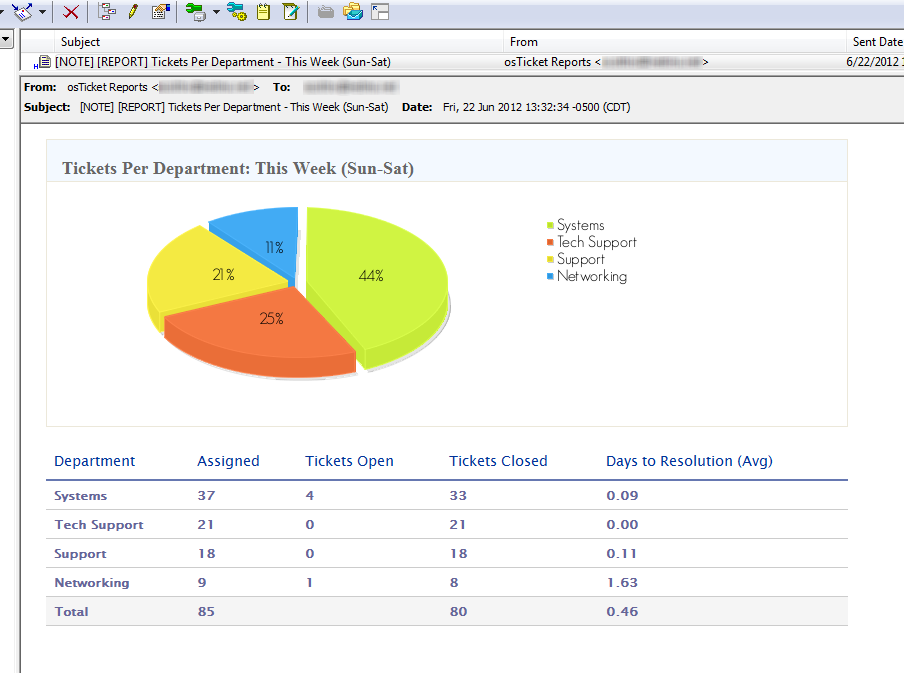
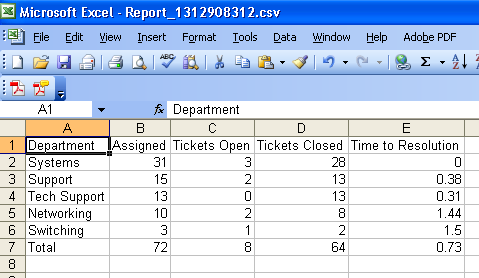
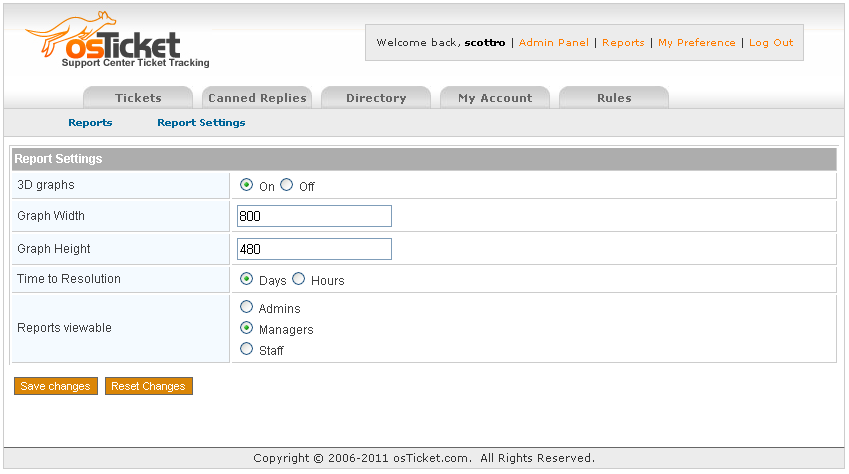
NOTE: If you are running any versions from 2.3 to 4.1 the “Replies per Staff” report is WRONG. I strongly suggest you upgrade to 4.2+
Ok, so after being on the osTicket forum since July 2009 I’ve noticed that one big MOD that everyone wants and never fully gets is reporting. The following is my stab at it.
This MOD has been implemented and tested on 1.6ST and 1.6RC5, please let me know if you run into any issues.
Note: For version 3.3+ you will need to create a scp/reports folder (and make sure its writable by Apache) and place the image (csv.png) into the scp/images folder.
Requirements: MySQL 5
Note: Reports v2.4+ is compatible with Internet Explorer.
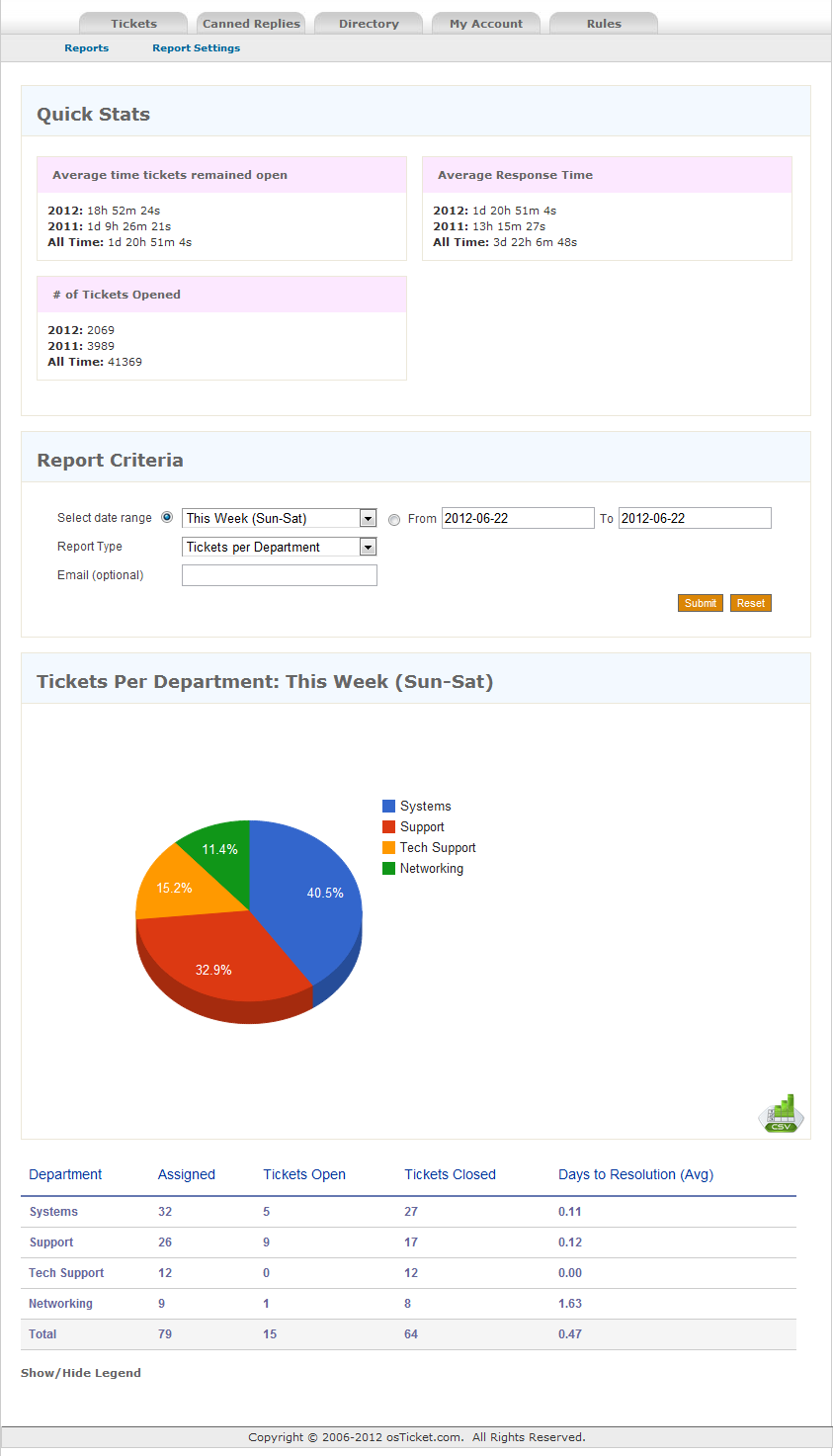
First off you need your actual reports.php page…
English v4.2 (Place in your scp/ folder)
Now available in Italiano! Grazie playsoft!
Italiano v3.4
Now you just need to be able to easily browse to it
include/staff/header.inc.php
Replace:
<div id="container">
<div id="header">
<a id="logo" href="index.php" title="osTicket"><img src="images/ostlogo.jpg" width="188" height="72" alt="osTicket"></a>
<p id="info">Welcome back, <strong><?=$thisuser->getUsername()?></strong>
<?php
if($thisuser->isAdmin() && !defined('ADMINPAGE')) { ?>
| <a href="admin.php">Admin Panel</a>
<?}else{?>
| <a href="index.php">Staff Panel</a>
<?}?>
| <a href="profile.php?t=pref">My Preference</a> | <a href="logout.php">Log Out</a></p>
with
<?
// Get the report options
$OptionsQuery = "SELECT viewable from ost_reports LIMIT 1";
$OptionsResult = mysql_query($OptionsQuery) or die(mysql_error());
while($graphOptions = mysql_fetch_array($OptionsResult)){?>
<div id="container">
<div id="header">
<a id="logo" href="index.php" title="osTicket"><img src="images/ostlogo.jpg" width="188" height="72" alt="osTicket"></a>
<p id="info">Welcome back, <strong><?=$thisuser->getUsername()?></strong>
<?php
if($thisuser->isAdmin() && !defined('ADMINPAGE')) { ?>
| <a href="admin.php">Admin Panel</a> | <a href="reports.php">Reports</a>
<?}else{?>
| <a href="index.php">Staff Panel </a> <? if((!$thisuser->isadmin() && !$thisuser->isManager() && $graphOptions['viewable']=='staff') ||
(!$thisuser->isadmin() && $thisuser->isManager() && (($graphOptions['viewable']=='managers') || ($graphOptions['viewable']=='staff'))) ||
$thisuser->isadmin())
{?> | <a href="reports.php">Reports</a> <?}?>
<?}?>
| <?="$isdeptmanager";?><a href="profile.php?t=pref">My Preference</a> | <a href="logout.php">Log Out</a></p>
<?}?>
In order to use the “Report Settings” (admin) page then you’ll need to add a new table to your database and then fill it with initial data, make sure and change the table prefix (ost_) if you are not using the default.
CREATE TABLE `YOUR_DATABASE_NAME`.`ost_reports` ( `3d` TINYINT NOT NULL , `graphWidth` INT NOT NULL , `graphHeight` INT NOT NULL , `resolution` VARCHAR( 255 ) NOT NULL , `viewable` VARCHAR( 255 ) NOT NULL ) ENGINE = MYISAM ;
INSERT INTO `YOUR_DATABASE_NAME`.`ost_reports` (`3d`, `graphWidth`, `graphHeight`, `resolution`, `viewable`) VALUES ('1', '400', '240', 'hours', 'admins');
Add the REPORTS_TABLE constant to main.inc.php
below
define('GROUP_TABLE',TABLE_PREFIX.'groups');
add
define('REPORTS_TABLE',TABLE_PREFIX.'reports');
ToDo
- Email report
- Average time to initial response.
- Sorting by column title
- Language Support


Does this include closed tickets or only live/created? Please confirm
Also graphs would be nice!
Thanks,
Thomas, this includes all tickets (presently they are all lumped into one). Today I will be working on showing a column with how many are open, average time to first response, average time to completion, etc. I will also be working on graphs. Please let me know if there is anything else you would like to see added. This is just the first “draft” so to speak.
If I select ‘All time’ and then ask for tickets per day – I don’t get everyday – only every other one – why is this?
Or is it only showing tickets opened on these days?
The other amends will help make this a more powerful reporting tool.
I have no other requests at this time – i’m not cheeky
Thanks,
Thomas
P.S Will you have the extra stuff done today?
Another thing (I forgot!) – when you run ‘Ticket per day’ the results are not in order by date but by the day of the week. Can this be changed as it is confusing.
Thomas
Fixed in 1.2 (published)
Cheers
P.S looks good
Question -
What does ‘open’ ouput? It says I have 6 open tickets but more than 6 tickets are open.
Confused.
Hmmm, sorry about that. Maybe I should change that to “opened” or “created”. Thats the count of tickets that were opened in that reports particular time range. Thoughts?
then that answers my question. tickets opened is probably better.
maybe a suggestion to you would be that the column headers e.g. opened, created and assigned could be a little more descriptive. maybe a mouse hover to give a better description? or use square brackets to explain.
How does the average time to close a ticket work? What calculation is this based upon?
GREAT WORK!!!
p.s my suggestions are purely to help me and others
Thanks alot,
Thomas
Thomas, yes “All time” will only report on days that had a ticket created on that day. Otherwise there is nothing to report.
The extra stuff won’t be done today but I will be releasing v1.5 as soon as the graphs are ready (and I’ve already got 2 of those functioning). Also, I had not noticed the behavior on “Tickets per day”, I will work on fixing that.
Thanks for the feedback!
Just curious I followed the instructions and this is what it tells me:
Table ‘osticket.REPORTS_TABLE’ doesn’t exist
Sounds like you missed the step about adding the REPORTS_TABLE constant (see right before the ToDo note at the end of the article).
Thanks for this much needed addition to osTicket!
Great addition and good work! I do have one request though, I’d love it if I could get a breakdown of tickets per Help Topic as that would be far more useful to my organization vs. per department.
Thanks!
Cool, I’ll see what I can come up with. It’ll probably be next week though as I’m assisting someone recovering websites from their crashed web server right now…. with no backups and no redundancy :\
No problem, thanks for the quick response and good luck with recovering that web server!
This is still on my todo list but I’ve got to make some modifications for one of my other departments in the company before I can look into it and then another pay for job after that so it may be awhile. I won’t forget about it though
OK, cool. Thanks Scott.
Nathan,
I looked into this but I don’t think I can do anything with it. The tickets table has nothing in common with the help_topics table except a field labeled “topic”. In my tickets database all of the “topic” fields are either empty or NULL. It would appear that the only use for the Help Topics is in getting them assigned to the right department. There is no way to count how many tickets have been created as a result of using a Help Topic. Please correct me if I’m wrong but that’s what I’ve found. However, we don’t use the web interface for customers so its one of the things I’m least knowledgeable about.
Nevermind what I said, so long as you get 3.1+ and have osTickets 1.6 Standard this report is now available.
Cool, thanks!
Could this be a problem or is me being stupid?
The tickets completed figure based on an ‘All time’ report is giving me the months since April 2010 the figures added up is 5302. So 5302 tickets have been created since April 2010.
However when I look at the closed tickets list in Osticket it shows me 5432. Only 71 tickets are currently open.
Why doesn’t it add up?
Hmm, not sure whats going on there. I just added up mine and I have an exact match. When you say you have 71 tickets open is that open alone, or are you counting 71 open and/or answered? If I count my open and my answered and add that to my closed tickets my total equals the total on the report.
I don’t use answered tickets. Its just open, assigned and closed.
I add 73 open tickets to 5334 closed tickets.
It gives me 5507.
UPDATE – All time does not give me the last 3 months for this year (2011) hence the big difference.
Want a screenshot? Email me and I will send you a screenshot.
Confirmed: I get the same thing on mine. It goes through March 2011 and then there is a large section just titled “Other”. I’ll look into it as soon as I can.
Just making a note here that this has been fixed.
Also and not sure whether you were aware of this.
Select date range – Yesterday – Tickets per day
Doesn’t just give me yesterday (Monday) it gives me today and yesterday.
The date range was ‘Yesterday’ not ‘Yesterday and today’ ???
Thomas
I just tried this on my system and it gave me yesterday only (2011-06-20). Can you send that screenshot over to me at scott (at) sudobash (dot) net ?
Please include as much of the page as possible, including the form.
This has been fixed in v2.2
Hi Scott, great work, I am using IE and osticket_1.6.0 and getting no graphs, and also can you please clarify what u mean by “Days to Resolution”
Many thanks
Surjan, The report not working in Internet Explorer is a known/noted bug. I’m still working on it and hope to have it resolved in the next week or so but we’ll see. The “Days to Resolution” is the time in the database between the ‘created’ field and the ‘closed’ field.
cheers Scott for the quick response, I look forward to the IE fix, as all our users use IE as their primary browser!…Also what is the difference between “Assigned”,”Open”, “Answered”. I notice you use “Assigned” and “Tickets Open”, can you please explain…..really appreciate your help Scott….
Surjan
Assigned is how many tickets are assigned to that staff or department given the time range. “Tickets Open” has actually been replaced in later versions with “Tickets Created” as thats how many tickets were created given the time range. “Answered” are tickets that are open but staff has already replied to them and expecting a response.
Sorry Scott I dont know what u mean by “tickets created” for “Tickets Open” or I am being stupid or something….so u can be assigned 20 tickets but only x numbers of tickets are created??….im confused…
or is it that there can be 20 tickets created in Total and only 15 of those being assigned to u?, so in some cases Tickets Assigned and Tickets Open will be the same?
Right,
Tickets Created = Total count of tickets created during the time range
Assigned = How many tickets are assigned to that staff during the time range.
cheers Scott, one more thing what do u mean by time range?
and secondly in your reporting module will you be including the option to search by subject i.e. how many tickets per month on i.e. login problems, or printer issues etc so there is a topic (string of words) associated to the ticket(s).
Surjan
I can put that on the To Do list if you like
Scott,
The mod works GREAT. Thanks so much, and I’ll keep an eye out for the fix allowing the display of graphs in IE…
Thanks again!
Awesome, thanks!
IE issue is fixed in versions 2.4+
Hi,
We use OSTicket as a ticket system on our intranet, would it be possible to include who logged the ticket from the client interface? email address would be fine.
Thanks once again for a great MOD
Do you mean you want a report with count of tickets per “customer” email address?
Scott, just wondering how the fix for the graphs showing in IE is going?
Nothing yet but I’ve just finished work on a MOD so hopefully I’ll be able to look into it today.
Fixed in 2.4
Scott, brilliant, thank you you have helped so many people in doing this….BUT
in the database I currently have 12 tickets, (none in close), however, the report MOD “selected data range: This month”, “Report Type: Tickets Per Day” gives me 20 in total….and yes I have created and deleted tickets, just wondeing does the code remember deleted tickets too! and are these somewhere in the database if so….
cheers
Surjan
Surjan,
Can you run the following and see what your total number of rows returned is?
SELECT *
FROM `ost_ticket`
WHERE created >= ’2011-06-01 00:00:00′;
Are the results expected or unexpected?
My report gives me 294 and that command gives me 256. Investigating.
KK, Scott, I will run this tommorow at work, as I dont have a copy of the database and I will post the reply ASAP…so do u think this is a bug or something and have other people said anything similiar?
look forward to the outcome….also can you quickly explain how “Hours to resolution” works if u have not sent an overdue parameter, how is it computed…
Scott, some more feedback on the new change……I what i have realised is that when if you a ticket has been closed and then reopned and assigned, the report treats this as a new tickets and adds this to the reports as a new ticket regardless whether its new or old, it does not treat it as a unique ticketsm which can be misleading when reporting to management etc……it also increments the “tickets per day” report as wel as others….
have you noticed this?
the first request is also true…i.e. displaying more tickets than in the database!
Cheers
Surjan
actually Scott, thinking about its okay in whats its doing, if a ticket is closed and reopend then effectively is a new ticket, but do you think it should show up on the day its was reopened rather than on the day it was created?
The extra tickets is still a problem or not as the case may be!
Fixed. Had to add a DISTINCT() around the ‘number’ count. Applied the same to the repliesPerStaff count.
Cheers Scott, ur a star! I will test tommorow, can you please upload the new code, will this be v2.5? I am assuming that the reports operate only from tickets in the database, so if tickets are deleted they are not taken into cosideration?, which means tickets CANNOT be deleted…for the first year anyway? otherwise your reports will officially be wrong!!
therefore is there a way to archive the closed tickets, and then pull them from this archive i.e. txt files when required i.e. reporting, searching etc, otherwise you will end up with potentially hundreds of tickets until you decide to delete!….from my knowledge osticket by default does not do this?….if not is this something you can help us with, please? this way the reporting MOD can also use this….
2 other things:-
1. Can you please explain how “Hours to resolution” is computed and its purpose.
2. Also have you come across some code where an email can be sent to the ticker creator i.e. user when it has been closed by staff members.
Really appreciate your help on this Scott…
Cheers
Surjan
Correct, deleted tickets cannot be considered. There is nothing I can do about that except say that if you want more accurate reports then don’t delete any tickets. As for archiving the only thing we do is close the ticket. The only tickets we ever delete are spam. We always want to have records of everything so if a customer comes back and says “I never said to do XYZ!” We can look at the closed ticket and know whether they are correct or not, things like that.
Hours to Resolution is the time difference in hours between the “created” field and the “closed” field. There is a bug here though because this will compute whatever is in the closed field, even if a ticket is reopened it can have a closed field. I’m considering options for fixes on this, one being make osTickets set closed to null when re-opening. The good thing is that when the ticket gets closed again the “closed” field gets updated and the report will then be accurate again. Hours to resolution is an average time of each tickets resolution.
I have not come across nor made an MOD to inform customers on ticket close.
Hi Scott, just wondering if you can upload the new code or tell me how to change
Cheers
Surjan
Oops, missed one spot when I updated my source code. Should be in the zip file now.
Hi Scott, great new addition, have not tested the new report MOD yet i.e. duplication of tickets, but I am sure it will be fine. Love the new report settings feature!
Also going back to my original blogg, there is a massive demand to send an email on closed tickets to the user, is this something you can help us with? please…
There is one guy who created a MOD where an email is sent to staff i.e. all departments when a ticket is closed, which in theory should be easy to modify to send an email to user rather than departments but no luck, could you please help us on this, the forum for the department MOD was:-
http://www.openscriptsolution.com/2010/02/27/closed-ticket-alert-for-all-department-members-in-osticket-v1-6-st-stable/
you may be able to see the change better than us…
cheers
surjan
Hi Scott, tested the report works great thank you so much, and great addition to the reporting system too, well done!
You may remember the request about putting in a search box when searching i.e. logging, printing etc, where you could see the number of tickets per subject, is this something you could add to the MOD?
——————————————-
Also is there any way you could help us with an existing MOD which send out an email to all departments when a ticket is closed, however, there are a lot of people who require an email to be sent to the client when a ticket is closed by a member of staff. I have tried to change this MOD but no luck, is this something you can do/help us with?
This existing MOD can be found at:-
http://www.openscriptsolution.com/2010/02/27/closed-ticket-alert-for-all-department-members-in-osticket-v1-6-st-stable/
Cheers
Surjan
Much better Scott.
Well done.
Thank you for the great MOD.
I would appreciate it if you could look into the possibility of being able to produce the reports based on the date range, report type i.e Tickect per Staff on departmental basis. In other words, I need to be able to select the date range then the department I am interested in and then the report type, typically the Tickects per Staff in my case.
Thanks,
Beeman
So you mean you want to be able to search by staff but filter it by department. So get all staff in department X and report on them?
Yes, that is correct. Will this be possible?
beeman,
Sorry – not sure how I missed getting back to you on this one. I’ll see about adding it to the next version when I get some time.
Scott, great new addition, just wondering if there any way of searching by a single help topic i.e. rather a report giving ALL help topics.
Surjan
Nothing at present. Probably wouldn’t include it in a general release as the “all help topics” would be including it otherwise anyway.
kk, Scott, also is it possible to release a copy of the report MOD without the addtional reporting features but with the “All Help Topics” option. I notice that by adjusting the size of the graph it puts a lot of large white empty space around the graphs…if would be really appreciated, as i like the fixed size as before, but also like the “All Help….”, if you can please send to my email address: singh_surjan (at) hotmail (dot) com.
cheers
surjan
Surjan,
Sorry but I don’t have time to go back and strip out the settings stuff. Best I can suggest is to just set the dimensions to something specific and then ask that no one changes them. The dimensions saved in the database end up doing the exact same thing as static settings would do except that they are more easily changed. I believe on mine I have it set to 800×480 and it looks good.
PS, changed your email address format to make it a little more difficult for spiders to crawl my site and grab your email address.
Cheers for the advise Scott, I appreciate that it would be time consuming and I will try the suggested size….and yes thanks for changing the email address…
Surjan
Hi,
I just installed the mod, and I receive this when trying to run any report:
“You have an error in your SQL syntax; check the manual that corresponds to your MySQL server version for the right syntax to use near ‘(HOUR, ost_ticket.created, ost_ticket.closed)),2) AS hoursAVG, ROUND’ at line 2″
Thanks for your help!
Stephen
Does your full line for that code look like the following?
ROUND(AVG(TIMESTAMPDIFF(HOUR, ost_ticket.created, ost_ticket.closed)),2) AS hoursAVG
If so, what version of MySQL are you using?
Hi,
Yes, the full line of code looks like that. I’m running mysql 4.1.22-2.el4_8.4
Thanks,
Stephen
Ok,
Thats the problem then. “TIMESTAMPDIFF” was introduced in MySQL 5.0.0
Hi Scott, testing the MOD this morning but I am getting no results, no graphs…just total 0
I just did a ‘wget’ and grabbed the current version from this article and ran a few test reports and they all worked ok.
thanks Scott, I got it working I was using some old code!!..
also i have some tickets in the system which have not been closed yet but the report still comes up with a “days to resolution” number. I thought that this number was only produced once the ticket had been closed i.e. ticket open – ticked closed = days to resolution?
Surjan
also i have some tickets in the system which have not been closed yet but the report still comes up with a “days to resolution” number. I thought that this number was only produced once the ticket had been closed i.e. ticket open – ticked closed = days to resolution?
Is it possible these tickets were closed before and are now reopened? Unfortunately when a ticket is re-opened the closed date is not set to NULL (its on my todo list) and so the number would still be calculated even though the ticket is not presently closed.
PS: Sorry for the delay in getting back to you. I’ve got several projects going on now and I’m just taking a few minutes to go back through comments and make sure I’ve taken care of everyone.
Hi Scott,
I would appreciate it if you could into the possibility of reporting against some kind of an SLA. For an example, we need to be able to run a report on the number of tickets (per department and/or per staff basis) cleared within and outside a certain time range, i.e 3-days for instance and then be able to export the results via CSV or TXT or XLS or PDF for further analysis. An ability to also graph the results would be cool too. Thank you for the wonderful work you are doing with osTicket.
Regards,
Beeman.
beeman,
Do you mean you want to know how many tickets were opened and closed within 1 day, 2 days, 3 days, etc. and then be able to export that?
Hi Scott,
Yes that is correct. It will help us immensely in trying to manage and measure our performance against a specified SLA’s with our clients. Ideally the “SLA” time range should be configurable. So typical how I would use this feature would be to:
1) Select date range of say “This year”
2) Select Report Type of say “Tickets per department”
3) Select say “SLA date range” or “Ticket resolved within” and have various options in that drop down menu like; less than 3 days, less than a week/7 days, etc.
PLease see my other post I posted on June 30, 2011 at 7:43am about the ability to report against departmental staff as well. The capability to report against departmental staff could be integrated into this request as well meaning one could have the follwing options;
1) Select date range of say “This year”
2) Select Report Type of say “Staff per Department” (this will report on Tickets per staff on a departmental basis)
3) Select say “SLA date range” or “Ticket resolved within” and have various options in that drop down menu like; less than 3 days, less than a week/7 days, etc.
I suppose point no 2 above could be split into two drop down boxes with one selecting the “Department” and the other selecting “Tickets per Staff”. Once the report is generated it could be exported as requested.
I hope the explanation make sense.
Regards,
Beeman
Beeman,
I’ve got some paid jobs going right now but I’ll put this on my todo list and give it some time when I can.
Hi Scott,
Thank you for considering my suggestion; it is highly appreciated and I think it will make your reporting MOD a really cool feature of the osticket system.
Regards,
Beeman.
1.what is this feature, where these column added in 3.2 reposts version.
– Feature: Added “Tickets Open” and “Tickets Closed” columns.
2. Can you please add selection box”ticket status = all, open, assigned, closed” so user can see all|open|assigned|closed tickets per department|day|month|staff
it will help to see statistics per status wise.
or more specifically:
tickets per month| day—–ticket status selection box “created,close,open”(created in that month|day but not closed in that month|day)
tickets per department| staff—-ticket status selection box-assigned,closed,open(assigned to department|staff but not closed yet)
reports3.2.1 version is answers of my requests. thanks.
Scott, I would just like to say a huge thank you, everything is running fine now….you have done a great job
Kind Regards
Surjan
Awesome, glad to hear it! Thanks for the feedback!
Regarding Tickets per Help Topic:
Its having total count of tickets per help topic.
it would be more helpful if having other columns like open ,closed, assigned(to staff) . to staff because staff is physical entity to reply and close ticket.
Hi Scott,
I have just added the reporting link I am using v1.6 and updated the database but no graph is displayed whatsoever. the only thing that i have not been able to do is add the insert into database name option where does that go are there any in depth instructions for me to follow from?
cheers
Paul
hehe yea, thats the part that holds all of your graph data. You need to get into either phpmyadmin or a command line to your mysql and copy paste (and set to your database name) those entries and then you should be good to go.
Hi Scott, I have a problem, when I make the reports by Personal I’m gettin’ just all the closed tickets in “Unassigned” and the open tickets with the assigned personal, that’s normal? I would like to see the graphs by personal even if the ticked is closed. I Hope u can help me !
btw, excellent mod !!
cheers
Armando
Thats because by default osTickets unassigns tickets once they are closed – don’t ask – I have no idea why, doesn’t make sense to me.
See my note on the following article: http://sudobash.net/?p=158
Look for:
Now you may notice that after you close a ticket that is assigned to someone that assignment gets removed. I have found this undesirable so we’ll edit the following
Thx 4 your quickly response ! was helpful !
Hi Scott, congratulations on your mod. I have read the complete post before doing this question
You have mentioned Tickets Created, but I can´t see those in your mod. I understand they are used to do some math. In the Report Type Tickets per staff I do not see a Ticket Created column, just Staff, Assigned, Tickets Open, Tickets Closed, Hours to Resolution (Avg). I am missing something?
Best regards.
Scott, I have seen that you have in other Report type, Ticket Created Column, but I think is important to know how many tickets are “created” by staff. Best regards,
So you want to know how many tickets the staff created via the web interface as opposed to how many clients created via email/web ?
Scott, exactly. I need to know how many tickets my staff (employees) do. This is because we receive many email, phone requirements and we make tickets and assign them on behalf our customers. And for follow up purposes is very interesting to know how many tickets are created by the staff (detailed).
Best regards and many thanks for answering my comment.
Hi again,
after playing some with your MODs, I’ve slighlty extended Reports to have a graph “Tickets per customer”. Numbers are ok but graph doesn’t show up: before diving into code again, any suggestion on best way to debug it?
Thanks again,
rash*
Never mind! Solved it!
Wonderful! It was easier than expected, a bit of a hack but working!
If you want I can send you my modified version of reports.php, it could be of some help (hopefully) even if not particularly nice.
Cheers,
rash*
I had attempted this once before but it was very messy since alot of the tickets have such different entries such as email address, email address and name, email address in brackets, name with email in brackets, name with email in quotes and brackets, etc.
Send it along, maybe you figured some of that junk out and I won’t have to worry about it?
Thanks
Hello Rashmani,
I am interested in your modified code to get the “Tickets per Customer” reporting. Do you mind sharing the code? Scott is there a possibility of including this MOD in your future releases? Thank you for a great feature.
If I can get it to where its not a jumble of random entries then I’d certainly like to include it.
Hi there,
yep, no problem in sharing.
Just, let me clean it up a bit first.
Main point is: I was mainly testing if that could be done, so haven’t written too specific SQL to retrieve tickets, just added up to the existing. By the end of the day I should be able to give you a better version.
rash*
Scott,
sent you and Beeman a pm on OST forum.
Lemme know.
Cheers,
rash*
Start by comparing a graph that does show up to a graph that does not show up. How to do this? Run each report and the view source of the report page. I recommend doing reports that are smaller (like only have a few results) that will make it easier to look through.
Hi Scott,
This module is very very good, i include an option to select other Graph types see below:
after this line:
<option value="repliesPerStaff" >Replies per staffInclude this:
Graph Type
<option value="AreaChart" /> Area
<option value="BarChart" /> Bar
<!--<option value="CandlestickChart" /> Candle Stick//-->
<option value="ColumnChart" /> Collum
<option value="ComboChart" /> Combo
<!--<option value="Gauge" /> Gauge
<option value="GeoChart" /> Geo//-->
<option value="LineChart" /> Line
<option value="PieChart" /> Pie
<!--<option value="ScatterChart" /> Scatter
<option value="TreeMap" /> Tree//-->
Replace this:
var chart = new google.visualization.PieChart(document.getElementById('chart_div'));with:
var chart = new google.visualization.(document.getElementById('chart_div'));
Your code 3.3 don’t have any reference to csv.png, i include replacing this:
<a href='' />Download Reportwith:
<a href='' />
Have a nice day.
Adriano,
Thanks for the heads up on the image, I have fixed the image and also included the reports folder by default now.
As to the Chart options I had tested including them before but decided against it as some of them just looked bad. I may return to them and have them available as an option either on the report itself or in the admin area.
Thank you for an awesome mod. Blessings.
I do want to run an issue that I am finding with reports. When I run the tickets per staff, it shows all closed tickets as unassigned so I end up with a glob of unassigned tickets and the staff only gets credit for whatever they have open at the moment.
Is that done on purpose?
Thank you for the answer.
From another article of mine:
Now you may notice that after you close a ticket that is assigned to someone that assignment gets removed. I have found this undesirable so we’ll edit the following
include/class.ticket.php
remove staff_id=0 from the following line:
$sql= 'UPDATE '.TICKET_TABLE.' SET status='.db_input('closed').',isoverdue=0,duedate=NULL,updated=NOW(),closed=NOW() '.
Hi guys. Here is my Spanish version of this grate MOD! v.3.3.1. Thanks! http://www.enviomovil.com/reports_v331_es_ES.zip
Just remember the change on the header (done before by camilojaraba!)
Hi,
First off, thanks for contributing! We look forward to using your product. I downloaded your files and copied them to the SCP folder. I made the folder Reports writable, and then made the changes to the header file. The Reports link shows up like it is supposed to. I then added the table and populated it with data:
Table Data
Table ost_reports in database helpdesk
3d graphWidth graphHeight resolution viewable
1 400 240 hours admins
When I click the Reports link it takes me to a blank page. Did I miss a step?
Any help is appreciated
Randy
Disregard…….for some reason all your files received read permissions with the exception of reports.php. Because it was not readable it showed as a blank page in firefox. It’s working now
hi,
does not work for me. and “admin reports” I’m just a white page.
what am I doing wrong?
Have you checked your permissions?
Hmm, hard to say with a blank page. Can you view page source and see if there are any hints in there?
Would it be possible to have the reporting also add time worked? would be a great addition to time mod
This is a planned feature for the future of reports, I just haven’t yet had success with it during the limited time I’ve had to work on it
awesome, as soon as you do….i will be a happy sys admin. I just saw your auto assign mod and I am about to try it out. i am on 1.6 stable, any issues there?
No that I can recall and/or am aware of. Please let me know if you find otherwise.
worked perfectly well. Awesome
Dear,
Thanks for the reporting tool, I have done the same which is told in your blog…
1. copied the files to upload/scp/
2. sql query was done, both creating the table as well insterting the content…
Later when i click on the report on the admin page, the apache server fails with an error:
Faulting application httpd.exe, version 2.2.11.0, faulting module php_mysql.dll, version 5.3.0.0, fault address 0×00002072.
Please do help me on this….
Thanks in advance…
Arvind,
I haven’t run into anything like that previously. It looks like you are running IIS which others have used this MOD on. Can you start off by making sure your files/folders are readable (and writable where necessary) by Apache?
Dear Scott,
First let me thank you for your response.
I am using WAMP Server, the time i click on the Report link Apache server encounters a problem and the error pops up. All the files and folders have Read/Write permission.
Apache Ver. 2.2.11
PHP Ver. 5.3.0
MySQL Ver. 5.1.36
When you setup the database, I assume you changed the “YOUR DATABASE NAME” to you actual name, also – do you have a custom prefix? If so did you change ost_reports to whatever your prefix is? whatever_reports?
I’m kinda grasping for straws here since no one else has yet reported this issue and I’m not at all familiar with Windows servers. Hopefully we can still get you running though
Dear Scott,
I got it fixed, there was a bug in php 5.3.0 where in “mysql_close();” should have a value. Replaced the same with”mysql_close($link);”
File edited was “scp\reports.php”
Thanks for your quick support and for the tool.
Thank you again……:)
Adding to my previouse comment, it has to be modified on both the files:
1. scp\reports.php
2. scp\reports_admin.php
At the end of the page, replacing “mysql_close();” with “mysql_close($link);”
Thank you……:)
Ah! Fantastic! I’m so glad you got it working. Thank you too for letting us know the problem and solution!
I have 2 osTicket setups right now. A live install and a test install.
I’ve modified the files, added the files to the scp folder, set up the table with the proper columns using phpmyadmin, and what I’ve noticed is this.
A: There are no links to the report page that show up for admins or anyone.
B: When I go to perform a report in the test install, it tries to pull data from the live osTicket database, and obviously that database doesn’t have reports set up on it.
Any suggestions?
ShepsCrook,
A. Did you edit include/staff/header.inc.php as noted?
B. I’m guessing your config file is pointed to your live environment instead of test.
Hey! Thanks for your effort its a great MOD for OSTickets, now in my 1.6RC is running.
Excellent! Thanks for the feedback
I love it! One thing though, it doesn’t appear to reflect “closed” ticket numbers. I’m piloting OSTicket and I’ve made and closed about two dozen tickets, but they are only counted under “unassigned, tickets”. Apart from this and the SSO mod, my install is stock.
Nate, once you’ve created the tickets are they actually being assigned? Also see the note about how osTicket by default unassigns tickets when they are closed. You’ll want to stop that in order for your reports to be accurate.
Yes, I create tickets, assign, then close. I looked at that note above, followed the link, and incorporated the attached files into my instance. I attempted to reopen and close a ticket, but was met with DB Error 1292:
[UPDATE ost_ticket SET status='closed',isoverdue=0,duedate="NULL",updated=NOW(),closed=NOW() WHERE ticket_id=13]
Incorrect datetime value: ‘NULL’ for column ‘duedate’ at row 1
So, I created a fresh ticket, assigned it, and closed it, but got the same result. Then I did the same, but added a due date during the opening process, but that didn’t help. Perhaps it’s trying to insert “NULL” as a string rather than an actual null?
I got it, I removed the quotes around NULL on line 390 of class.ticket.php.
Old:
$sql= ‘UPDATE ‘.TICKET_TABLE.’ SET status=’.db_input(‘closed’).’,isoverdue=0,duedate=”NULL”,updated=NOW(),closed=NOW() ‘.
New:
$sql= ‘UPDATE ‘.TICKET_TABLE.’ SET status=’.db_input(‘closed’).’,isoverdue=0,duedate=NULL,updated=NOW(),closed=NOW() ‘.
Hi Scott!!
One question to 3.4 version:
- can You tell me how to change Ticket per Client from “email” field to “name”?
Cheers,
Lucas
By the way, once again great work!
Thanks Lucas!
Right now how it works is it grabs both the email and the name and if email turns out to be empty then it will supply the name instead.
You could just have it report the name explicitly instead. There should be some places that echo $email. You should be able to just change those to echo $row['name'] instead.
I’m going off of memory here but I think that should be all you need to do.
hi
im having problems when i select any of the 4 first search types i got this error
====
You have an error in your SQL syntax; check the manual that corresponds to your MySQL server version for the right syntax to use near ‘(HOUR, ost_ticket.created, ost_ticket.closed)),2) AS hoursAVG, ROUN’ at line 2
====
any help plaese ?
thank you
What version of MySQL are you running?
MySQL 4.1.22-standard
Ah ok, thats the problem then. This MOD requires MySQL 5.
See: http://sudobash.net/?p=821#comment-1042
very very thank’s
Great MOD for OSTicket. It’s just what I was looking for! Thank you!
One suggestion: when installing OSTicket, you can choose a custom prefix for the tables (I did), but your code assumes the default ‘ost_’ will be used.
I had to do a search&replace through your code to get it working.
Maybe the table creation code could be integrated in reports_admin.php? Check if the table exists, and if it doesn’t, create it?
Urko,
Thanks for the feedback. Implementing the variables instead of static names is planned for a future release. The table creation in reports_admin.php is a good idea, I’ll see what I can do on that. Thanks for the suggestion!
Question – I have installed, and i can manually get to the reports_admin.php page and it is working, however the reports.php page comes up blank. I am unsure as to what I need to do to get this working, there is no error code to figure out where i need look for a bad line, or issue in the document.
Disregard – Same issue as other user, Read access none.
Hi
Is it possible to have a report that shows average response time ?
I often respond within minutes, resolve the issues, but leave the ticket open for a few days to ensure no recurring issues.
So the resolution time shows xxx hours for me..
Thanks
Tom, this is on my todo list but I’ve got alot on my plate right now with a major project at work, regular work duties, a personal project, the website, someone elses website and a new baby at home… not to mention trying to get some time in on Gears of War 3
Its definitely a future release though
Thanks for the reply..
Congrats on the baby
Scott, first this is one of the most useful mods to osTicket out there. Thank you for the time and effort that you put into this.
Second, I would definitely vote for adding response time to the table output. I’ve been working on adding this but haven’t gotten all the way through it.
Third, how hard would it be to add median resolution time? This would be most useful since many staff have a few tickets that may take months to get resolved (parts on order, etc.) which really seems to skew that data when using the AVG function. There doesn’t appear to be a built in function for median in MySQL.
Scott, I need to contact you for quoting a special requirenment for this mod if you have the time to dod it. Regards,
No problem, please email me at scott (at) sudobash (dot) net.
Hi Scott
Awesome addition
Thanks for the module, i added with no issues.
I do, however, have a suggestion.
Could you please consider adding reporting by sources?
This would be very usefull for me to see where the requests originate from.
Others may like this too
Thanks
Peter
Yea, I’d thought about doing that before but wasn’t sure if anyone would care. Apparently they (at least you) do.
I’ll put it on the todo list.
Hi Scott,
I notice that you have “Average time to initial response” on your To Do list. Any idea when this will be implemented?
No timeline as of yet. I have a major new project going right now and it will be included in that but so far I haven’t gotten to coding it.
i have followed instructions on how to add the reporting panel to osticket but is unable to make it work i get an internal error am i missing something
Whats the error you are getting?
404 – File or directory not found.
The resource you are looking for might have been removed, had its name changed, or is temporarily unavailable.
When do you get this error message? When you click on the link to go the the Reporting Panel? Right when you get to your ticketing system? Somewhere else?
I get the error when i go to the admin panel , click on the Report link/tab and then the error appears , i have added the table and the code for insert to ….. but still i get no report what am i doing wrong , is there still other code i need to configure
It sounds like you need to check location and permissions of scp/reports.php. If you are getting a 404 then its not finding the file you are requesting and if you’ve just clicked on the Reports link then that link should be pointing to scp/reports.php
I would also like to add a department drop down list when a user creates a ticket , so that i can know which department the user is from. Can you assist with this please
I tried to do this quickly yesterday and I got the code in easy enough for the form but there is something I’m not grasping in class.ticket.php when it processes that information. Don’t have time to look into it further at the moment though.
What you mean when you say permissions . within the /scp folder i have created a reports folder and placed the reports.php file in there
Who ‘owns’ the file? Is it owned by the same “user” that Apache is running as? Is it chmod’d to something like 0644?
Hi Scott Rowley,
Your support is highly appreciated. I need help on osticket about OVERDUE option, If you can suggest will be great help to me and osticket users too.
Query : Need a module where we can assign working days and time condition before it move to overdue option automatically. Company usually works monday to friday and working hours upto 6 PM.
Ex: lets system should make the ticket overdue after 4 days automatically if not closed based on initiated date. System should check the day and time without considering non working days, holidays and time also.
You might check with ntozier on the osTicket forums. I’m not sure if its his or not but he’s been using a “Pending” status that sounds similar to what you want. Otherwise at present I don’t have anything on an overdue MOD.
scott thanks for you assistance i finally got it working , file was placed in the wrong location .
Cool
Scott i am investigating an asset management system withing Osticket whereby i can track our hardware , software , serial numbers ect… and if a user logs a call i would like the user to specify there device model and version of OS , so that the techie can know what they dealing with
That sounds like a MOD request
I don’t have time right now for gratis MOD requests as I have some commercial MODs going right now as well as several other coding projects but if you’d like to request a Commercial MOD then just let me know, otherwise, you can always make the request on the osTickets forum as well.
Hi,
I have installed report mod. When i am clicking on report link, instance of mysql server is shutting down automatically. Please let me what i need to do ??
Thanks,
So you are just clicking on the link and the mysql daemon completely STOPS ON THE SERVER??
Yes, its stoping the mysql server instance automatically. To start the application again i need to start instance.
Thats very odd, at that point all it should be doing is as far as sql goes should be grabbing the ostversion from the database. What version of MySQL are you running?
Appreciate your prompt reply Mr. Scott. I am using MySQL 5.0 version which is running on window system
Are you able to tail your mysql log file and then click on the link? Then you can see exactly what is running and maybe get a better idea of why its crashing. Nothing in the report is intensive and should be breaking anything.
Hello,
This is a wonderful MOD.
I have just installed OSTicket and was asked to make a Reports section. It works if I don’t try to save the csv file. However if I run the original code I get:
Warning: fopen(reports/Report_1320873153.csv) [function.fopen]: failed to open stream: Permission denied in D:\inetpub\wwwroot\apps\public\support\scp\reports.php on line 148
Can’t open reports/Report_1320873153.csv
First thing I checked was permissions, with php “is_writable()”. The directory “reports” is writable, but the file “reports/Report_1320873153.csv” isn’t. Now I’m stuck.
I use Windows 2008, IIS7, and OSTicket runs under SSL
Hmm, for what its worth I ran is_writable on my production Reports page and it says the file is not writable…and then proceeds to write to it anyway
Do you have access to the command line? Can you become the user that your webserver is running as and then try to create the file where its supposed to be?
You might also double check what line 148 is of reports.php (mine has been updated with more stuff so it would no longer match yours.) There should be stuff writing to that file long before line 148. Perhaps its not able to update it or something?
Hello, to fix this problem, write permission on the folder scp/reports, “chmod 755″ – only in the folder!!!
Greetings!
Thank you for the quick response!
the error (line 148) is on the first fopen() – depending on the type of post – after the comment “// Create CSV file column headers”
I am not sure how to logon to the server as IIS USER…
I’ve changed all “\n” to “\r\n” (windows) and fopen($file, ‘w’) to fopen($file, ‘wb’), still same thing. It may be related to SSL… I’ll turn off the file for the time being and use only the visual graph and table.
You were going in the right direction. I was pocking around and found that this server uses another web user. I gave it the write permission and voila!
Thanks a lot for this MOD!
Scott i am trying to search for some script to allow all users completing the new ticket form , to select their Active directory username , is it possible to add a button nect to the name field , so when they click on the button it will fetch the list of names from the Active Directory database. please let me know if there is script designed to perform such a task. This would be really great for all users , so that they dont have to type their name all the time .
If such a beast exists I don’t know of it. Something to consider though is that would mean that people could submit tickets as someone else. I don’t know what all impact that could have.
Scott it would be nice for a user to select their departments when logging a ticket , would it be possible to add script to add that function on the new ticket screen and the admin panel
Heya ,
I am having a issue after following the setup that the reports tab show but there is no reports settings button and when i click reports it goes blank could i be doing something wrong???
Regards
Lourens Lehmann
running 1.6st OS ticket on Linux box
Hi,
It is good but working only for admin users.
Not working for staff.
Staff’s are not able to see the reports page.
Can you help.
In the report settings page did you allow them to see it?
I have the same issue where I have set it to allow all staff to view reports and the option never appears. I have toggled the access page back to admin and then back to staff, and only admins can ever see the reports page. Thanks for this excellent tool!
Ok, I’ll take a look when I get a few minutes and post back. Might be a bit – I’ve got 4 major projects going on right now plus another person thats asked for help with the Age of Tickets column
I just checked this on my install running 3.4 and staff can see the link and view reports just fine (so long as admin has allowed for it.) They just can’t see the report settings link.
I was missing some code in the post that I actually had in place on my own install. Please see the change in code concerning header.inc.php – that should get you going. Please let me know if you run into any issues with it.
Thanks very much for fixing this.
Is it possible to change the “by client” report to explode the email and just do it by domain ie. @domain.com
we have multiple clients on different emails but work for the same company which we need the report for a full company not just one user.
Good idea, I ‘ll put it on the Reports to do list.
Works great – amazing
when i am running a report on per staff it shows only a very low number of tickets assigned but i know that more are assigned it says that over 2000 are not assigned and only 4 against each staff member?
The tickets you believe are assigned, are they opened or closed? By default osTickets removes the assignee once the ticket has been closed. If that is not the issue then I would recommend going through the installation steps again.
yes the tickets are closed, that is annoying as i would like to report on which staff are doing the most calls in the month. will need to find a way to stop osticket doing this.
I already answered that too
http://sudobash.net/?p=821#comment-1191
that doesnt work, the ticket is shown as closed but still shows up in the list of technician calls.
Fixed it by removing the comment from the open ticket section in tickets.inc.php
Hey Scott,
I managed to get your 3.4 report version to work with osTicket 1.6.0 ST, I did have some issue with the display of the report page under firefox, under chrome it was fine. I changed some of your work from html table’s into css styling using fieldset/legend tags which looks pretty cool on any browser.
I also added the stock osTicket js calendar on that page. I changed the date format to reflect what is being used elsewhere.
Being from euroland, I really hate that US date format and the fact it’s not easy to change throughout this application, I wanted it to be consistent with the rest as a trade off.
I’m incorporating this in a fork of the original code as you so nicely released under GPL. If you care to play with this, check https://github.com/gplv2/osTicket
Greetings, and tx for the work.
Any plans to add a average amount of tickets created?
For exmaple on a daily, weekly or monthly basis?
I’ll see what I can do about adding it when I get time
Dear Scott,
just wondering if you can add up a report type “tickets per issue”
as my company is requiring for it
hope you can help
pls advise
regards,
Ross Sapida
Ross,
I will add it to the wish list but right now I won’t have time as I have several major projects all going on at once.
Hi, thanks for the tool! When i tried to download English version, i got this
“Not Found
Sorry, but you are looking for something that isn’t here.”
Sorry about that, I turned on permalinks last night and that messed up the reference to my link. Its been fixed.
sorry for my bad english, greetings from mexico, I tried to install, but I want to see the report marks an error:
“No se puede abrir reports/Report_1326915337.csv”
is spanish version.
Thanks for MOD and answer
Double check the location and permissions of your reports folder. Thats always been the issue when I’ve seen this error.
hello,
in reports i see only this..
Department
Department tickets are assigned to.
Assigned
Number of tickets assigned to this department or staff during the given time period.
Tickets Open
Number of tickets that are PRESENTLY open that were created during the given time period.
Tickets Created
Number of tickets that were created during given time period.
Tickets Closed
Number of tickets that were closed during the given time period.
can you help me please…
br lexi
Can you send me a screenshot? scott (at) sudobash (dot) net
hi scott,
thx for your report…i love it.
Now i want to create 2 report
1. how many % cannot sloved ticket by the month (sum open ticket – sum ticket solved)
2. average turn around time to issue ticket resolution (in minutes)
thx for your advanced
Hi scott,
The ChangeLog link does not work.
Also $graphOptions['viewable'] in header.inc.php return null value.
Can you check it please?
Thx.
Ha, no wonder some people are complaining about the admin/manager/staff stuff not working. They are missing some important code!
The changelog link is fixed. I’m working on how to best present the change for header.inc.php to get everyone up to speed. Thanks for the heads up!
Please see the change in code concerning header.inc.php – that should get you going. Please let me know if you run into any issues with it.
Hi Scott
When I login as admin, I can view the report well. But I need reports to be available to the managers for there particular departments. Can you help with this?
Thanks in advance.
If you are running 4.1 or 4.2 then you should be able to just click on the Report Settings link and allow managers to be able to use the Reports MOD from there.
Hi Scott when i enter a username and email address for osticket to lookup the name against AD i get “ajax error: 500″ , i have followed the instruction give how to implement the code but still no luck
If you are querying an AD then I couldn’t help you. This and osTicket is coded by default to query SQL, I have no idea on AD.
Where are you entering that in anyway? None of my reports are set to run by a particular email address or username its just “Tickets per Client” and then it lists them all.
hi scott,
thx for your report…i love it.
Now i want to create report
1. how many % cannot sloved ticket by the month (sum open ticket – sum ticket solved)
because your report “tickets per month”, if the ticket solved in the next month, the ticket sum of on month of the ticket created. this is not really capture how many % ticket not solved by the month.
can you help me created for this report…?
appreciated for your help.
Hey thanks is work well, i got some error when i try to make a .csv report..
Unknown column ‘ticket.email’ in ‘order clause’
i add couple custom field like this:
Name: bobby dennie
Email: bobby_dennie@xxxxxx
Phone:
Location: south_africa
description: router
Model no / Part no 5555
Date of Purchase 02/03/2010
Source: Web
Help Topic: Support South Africa
IP Address: 119.75.62.50
Last Message: 02/16/2012 12:48 pm
how to modify to have complete list of customer with their email
Thanks
Sorry about that, you can either change it to just ‘email’ (from ticket.email) or just re-download the .zip file again. It has the change in there.
I am in a trial version and want to install the reporting module but does not leave me and copy the code, I made the database features and ls I get the report in Spanish version not Linck salts that is there someone could have fun please.
and meal time I run it says “object not localzado” If I can help they are grateful.
I can pass the Spanish version of reports in the league because it’s there contains nothing if I can pass is the agradecere
Hi, I tried to generate and report and keep getting the message “Can’t open reports/Report_1330482998.csv”. Any ideas?
Hi, check you permissions and that you have your paths all set correctly.
Thanks for the mod!
When I try to create a report I see at the bottom of the page:
“Can’t open reports/Report_1330711457.csv”
I can’t find that file anywhere.
Check your path and permissions.
Got it working. Found the user account that needed permissions to write to that folder.
Thanks again.
it didn’t work for me
I will have to try it on my own system to see if I can get it to work. It would also be nice to show a summary of the actual ticket for reporting. Anyway you can do that?
I’m not sure what you mean by a “summary of the actual ticket”. The report is for all the tickets in a given time period & category.
Just to make sure I am upgrading to v4.2 correctly:
I just download those files and copy and paste them and that is it or do I have to do the other steps as well?
Thanks
If you have never done the steps before then you’ll need to do them, otherwise if you already have done them you’ll just need the updated files.
Already have 4.1 installed so just first step then. Thanks!
hello scott,thanks for the mod
im newbie here, when I try to replace the code in the header.inc.php using the php editor, I got the blank web page. what wrong?
Maybe check the permissions of the file? Otherwise I’m not sure, you may have to do some troubleshooting to find the problem.
Sorry to bother but spanish version is not available
Sorry, the file was not hosted on my website and they appear to have taken it down. I’ll remove the link to it until we get someone else that has it or can translate it again.
Dear Scott;
Many thanks for great OS Reports Module we will support this in all ways.
i have installed as per the instructions and i am able to access the admin and reports menu.
When i try to generate report i get this error ‘Can’t open reports/Report_1332138127.csv’
What am i missing? Kindly assist.
Thanks
Dear Scott;
I just went through the comments from earlier threads and found the solution.
It is now working excellent for us. Good Work.
Great Mod for osticket…
Hi Mr. Scott,,
I have ask for this mod, can u show me how to make Report type by ” CLosed ticket ” not “Replies per staff ” ?
Hi Scott
one slight issue i have – when clients want to view there ticket status the get the following error: “500 – Internal server error.
There is a problem with the resource you are looking for, and it cannot be displayed.”
The admin side of the osticket works fine , can view , edit , delete the tickets ,
the other issue i have is , i have created departments within osticket via the admin panel but when the client logs a call and selects the department , when that support desk view the ticket they see support in the department column , how can i correct that so that the support desk dont have to edit the ticket all the time
Both of these issues are in relation so my MOD?
What do you mean ?
Are you saying these issues arrived after you installed the Reports MOD?
hi
i did all the steps as per your article. i got this error when i tried to get report
Can’t open reports/Report_1334658921.csv
Regards
Devang
Check the path and permissions of the reports folder.
Dear Scott,
Thanks for the great MOD! It works perfectly!
I was wondering if you could help me with the following:
We have a client who wants us to generate a report for them, to show how we responded to their tickets. Would it be possible to add more detail to the “Tickets per Client” report?
For example: “Hours to Resolution (Avg)” per client, or even per domain.
Like This:
Domain Tickets Created Tickets Open Tickets Closed Hours to Resolution (Avg)
@abc.com 25 5 20 22.00
This is the only thing we still need to make Osticket and your MOD the perfect solution for our company.
Regards,
Willem
Hello Scott,
You have done a wonderful reports.
Need a favor your end.I have installed 1.7 version and working fine.
Is there any magic you can do with Osticket 1.7 version.
I am not able to get reports on above version.
pls help.
Many thanks in Advance.
Angel .
Sorry, I haven’t played around with 1.7 yet and I probably won’t end up coding anything for Reports until 1.7 has a stable release.
Scott,
Thanks.But i found solution for v1.7 reports.
and working now.
Thank you for a wonderful software add-on. Look forward to the update that gives us auto-emailed reports. – with Gratitude-Jawed
Hi,
wonderfull mod , i just install it on my test instal of osticket 1.6
all works ok except this:
when i click on report settings it show me this error:
(my test site is hosted on cloudweb.com)
Internal Server Error
The server encountered an internal error or misconfiguration and was unable to complete your request.
Please contact the server administrator, webmaster@spazicreativi.org and inform them of the time the error occurred, and anything you might have done that may have caused the error.
More information about this error may be available in the server error log.
thanks a lot for any help or hint!
Additionally, a 404 Not Found error was encountered while trying to use an ErrorDocument to handle the request.
Tony,
Any time you get an Internal Server Error the first thing you should do is check your apache error log. It should say exactly what the issue is and give you a better idea about fixing it. Since your site is hosted elsewhere you may or may not have access to the error log. You may need to contact your host.
Hi,
it would be better to change the following lines in
include/staff/header.inc.php
from
$OptionsQuery = “SELECT viewable from ost_reports LIMIT 1″;
to
$OptionsQuery = “SELECT viewable from “.REPORTS_TABLE.” LIMIT 1″;
Thomas