
6.0.8
Fixed issue with Help Topic not reporting correctly, effected files: reports.php, reports_includes/functions.php, reports_includes/groups.php, reports_includes/reportGraph.php. Also removed several unneeded files that reduced the MOD zip file from over 4mb to just over 1mb.
Posts in category MySQL
osTicket> Reports 6.x Change Log
Jul29
2013 Written by Scott Rowley
2013
Written by Scott Rowley
osTicket> Reports 7.5 (1.10+)
Jun17
2013
Written by Scott Rowley
2013
Written by Scott Rowley
The reporting plugin has been moved to http://www.software-mods.com/reports.html
Thanks,
Scott
osTicket> Show external ticket ID in browser title.
Aug13
2012
Written by Scott Rowley
2012
Written by Scott Rowley


At my full time job we often reference the ticket ID that we are working on in our daily log, notes or when just when referencing it from person to person. The following will allow for showing the external ticket ID in the browser title.
First we need a new function to reference, find the following in
include/class.ticket.php
/*============== Functions below do not require an instance of the class to be used. To call it use Ticket::function(params); ==================*/
And add the following right after it:
function getExtIdById($id){
$sql ='SELECT ticketID FROM '.TICKET_TABLE.' ticket WHERE ticket_id='.db_input($id);
$res=db_query($sql);
if($res && db_num_rows($res))
list($extid)=db_fetch_row($res);
return $extid;
}
Now open up
include/staff/header.inc.php and add the following just after your <title> tag:
<?if(Ticket::getExtIdById($id)){ echo Ticket::getExtIdById($id)." - "; }?>
Update!
There are a couple of pages you may be on (like “My Preferences”) where the ticket class is not loaded. In order to make sure it’s loaded for use you can added the following just before the title tag:
require_once('../include/class.ticket.php');
Web Dev> Obtaining Google PageRank
Jun06
2012
Written by Scott Rowley
2012
Written by Scott Rowley
As a part of Search Engine Optimization (SEO) you may want to be aware of your websites (or clients websites) page rank on Google. After some researching I’ve found the following solutions to be best. I’ll be presenting a few options here, first we’ll cover how to look it up on prchecker.info. Second we’ll be covering how to look up the page rank using a perl script and finally we’ll cover how to look up your page rank with the perl script and update a mysql database with the information (for long term tracking and/or tracking multiple websites.)
READ MORE »
Web Dev> PHP function, check if a MySQL table exists
May01
2012
Written by Scott Rowley
2012
Written by Scott Rowley
Note: This is NOT original sudobash.net code. This has been copied over from ElectricToolBox.com, full credit goes to him/her (I couldn’t find a name anywhere).
The PHP function below gets passed in a tablename and an optional database name. If the database name is not passed in then it retrieves it using the MySQL function SELECT DATABASE(). It then queries the MySQL information schema to see if the table exists and then returns either true or false.
function table_exists($tablename, $database = false) {
if(!$database) {
$res = mysql_query("SELECT DATABASE()");
$database = mysql_result($res, 0);
}
$res = mysql_query("
SELECT COUNT(*) AS count
FROM information_schema.tables
WHERE table_schema = '$database'
AND table_name = '$tablename'
");
return mysql_result($res, 0) == 1;
}
The PHP MySQL functions are used in the above example. A database connection is assumed and there is no error checking, but you can modify it to utilise whatever database library / abstraction layer you are using in your project and improve how you see fit.
To use the function you’d do something like this:
if(table_exists('my_table_name')) {
// do something
}
else {
// do something else
}
and if you wanted to specify the database name as well (perhaps you are needing to query if the table exists in multiple databases other than the one you are currently connected to), you’d do this:
if(table_exists('my_table_name', 'my_database_name')) {
// do something
}
else {
// do something else
}
Web Dev> Populate PHP/HTML table from MySQL database
Jan11
2012
Written by Scott Rowley
2012
Written by Scott Rowley
Hey again all, for this post I’ll be covering how to populate a PHP/HTML table by way of looping through a table in mysql. I’ll be using the sample database provided by http://www.mysqltutorial.org/mysql-sample-database.aspx which has to do with models (cars, planes, ships, etc). Everyone has differing levels of knowledge so I’ll be including some basics as well such as connecting to the mysql database (and closing it later on).
The table we’ll be using in the database is ‘products’. It has the following columns:
productCode - A unique inventory number
productName - Name of the product
productLine - Basic descriptor, 'Motorcycles', 'Classic Cars', etc
productScale - This models scale size
productVendor - Company that built the model
productDescription - Detailed description of product
quantityInStock - Current number of quantity in stock
buyPrice - Listed price on the "website"
MSRP - Manufacturers Suggested Retail Price
If I know I’m going to be using my mysql database in multiple files I’ll always throw the connection in something like a ‘dbconnect.php’ file. Here’s an example:
<?php
mysql_connect(DBHOST, DBUSER, DBPASS) or die(mysql_error());
mysql_select_db(DBNAME) or die(mysql_error());
?>
Now you can include this in every file, or better yet in your header file which will get included everywhere else. So for example in your header.php file you could throw in:
<?php
require_once('dbconnect.php');
?>
Alright, so now you’ve got your connection to your database and the appropriate database selected. We’ll skip over the other content that you want to eventually add and say (for this example) that we want to list all of our models. We’ll look at doing this a few different ways, first off we’ll go simple and just request everything from the database and then we’ll tell php how to spit that all out to us.
READ MORE »
PHP> Export simple MySQL query to .csv file
Aug08
2011
Written by Scott Rowley
2011
Written by Scott Rowley
The following will allow you to export your mysql queries from mysql to a csv file that can be opened in several spreadsheet softwares. You may need to change the , (comma) to a ; (semi-colon) depending on your software.
A note for those of you using my osTicket Reports MOD: This is not what I’m using for that.
<?php
$host = 'localhost';
$user = 'userName';
$pass = 'password';
$db = 'databaseName';
$table = 'tableName';
$file = 'export';
$link = mysql_connect($host, $user, $pass) or die("Can not connect." . mysql_error());
mysql_select_db($db) or die("Can not connect.");
$result = mysql_query("SHOW COLUMNS FROM ".$table."");
if (mysql_num_rows($result) > 0) {
while ($row = mysql_fetch_assoc($result)) {
$csv_output .= $row['Field'].", ";
$i++;
}
}
$csv_output .= "\n";
$values = mysql_query("SELECT * FROM ".$table."");
while ($rowr = mysql_fetch_row($values)) {
for ($j=0;$j<$i;$j++) {
$csv_output .= $rowr[$j].", ";
}
$csv_output .= "\n";
}
$filename = $file."_".date("Y-m-d_H-i",time());
header("Content-type: application/vnd.ms-excel");
header("Content-disposition: csv" . date("Y-m-d") . ".csv");
header("Content-disposition: filename=".$filename.".csv");
print $csv_output;
exit;
?>
osTickets> Reports v5.0
Jun13
2011
Written by Scott Rowley
2011
Written by Scott Rowley
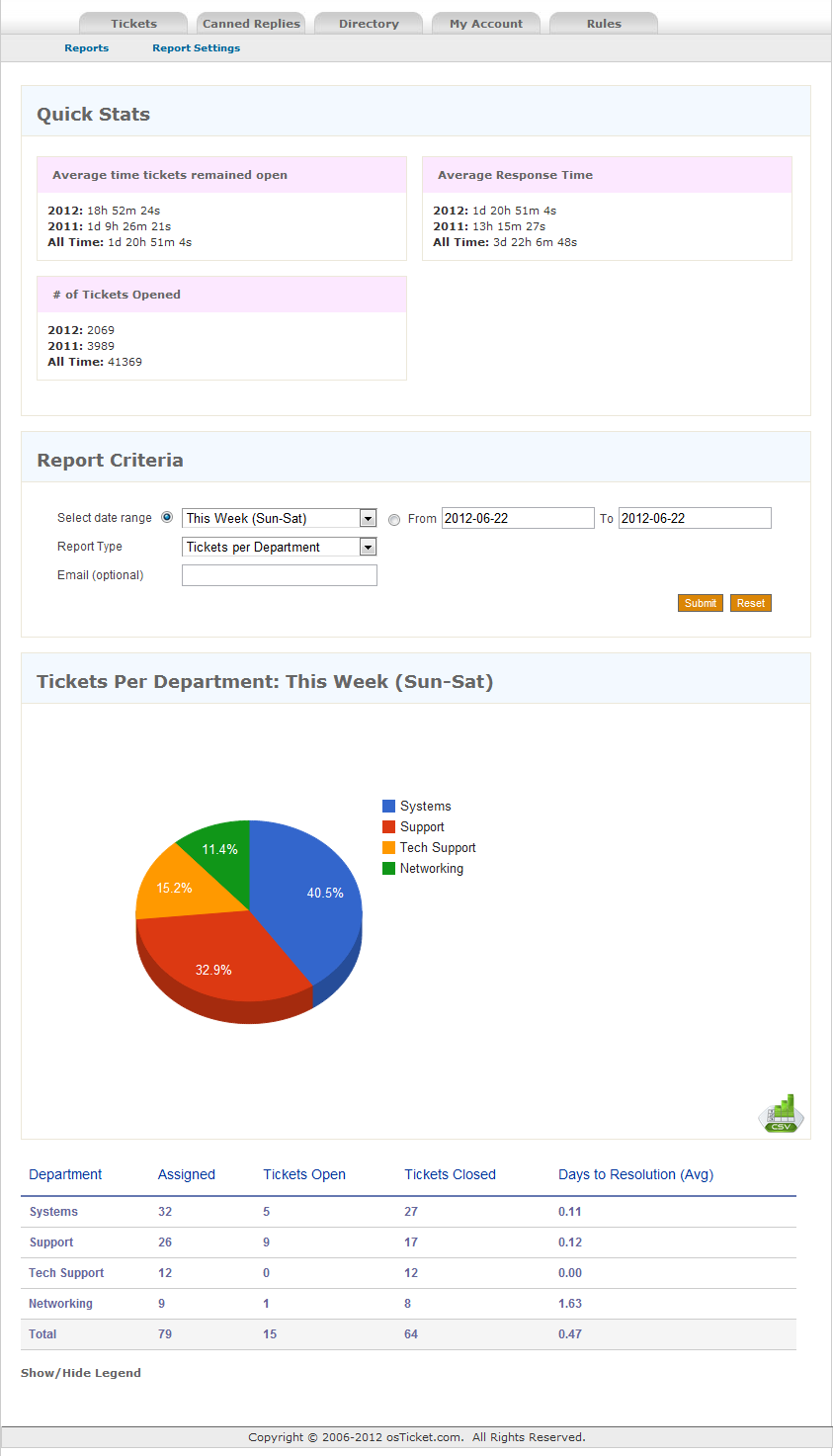
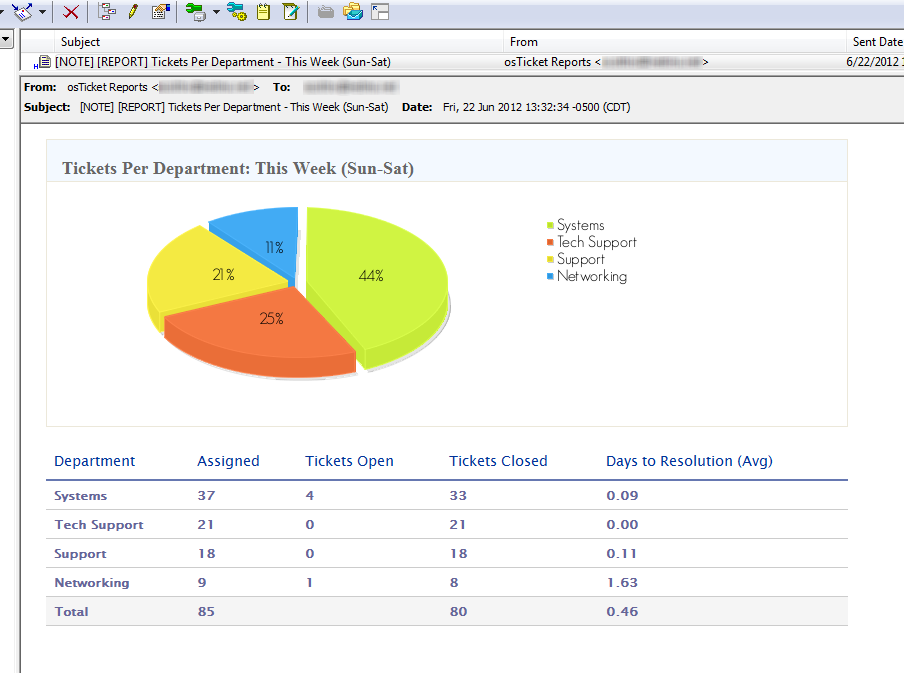
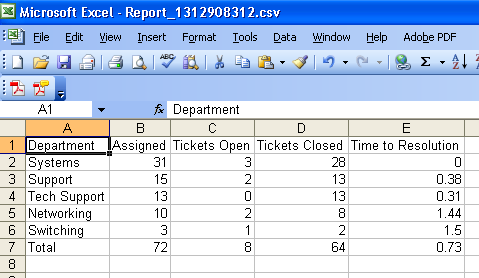
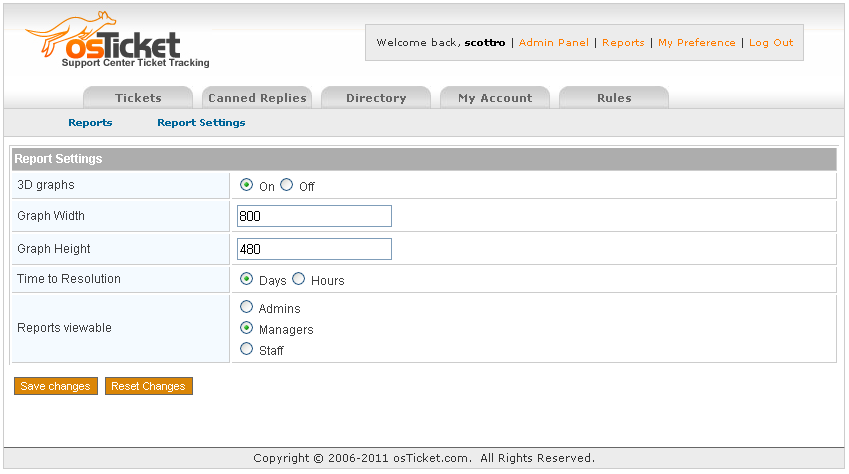
IT’S HERE! REPORTS 6.0 FOR OSTICKET VERSION 1.7
NOTE: If you are running any versions from 2.3 to 4.1 the “Replies per Staff” report is WRONG. I strongly suggest you upgrade to 4.2+
Ok, so after being on the osTicket forum since July 2009 I’ve noticed that one big MOD that everyone wants and never fully gets is reporting. The following is my stab at it.
This MOD has been implemented and tested on 1.6ST and 1.6RC5, please let me know if you run into any issues.
Note: For version 3.3+ you will need to create a scp/reports folder (and make sure its writable by Apache) and place the image (csv.png) into the scp/images folder.
Requirements: MySQL 5
pChart (for use with emailed reports) requires the GD and FreeType PHP extensions.
Note: Reports v2.4+ is compatible with Internet Explorer.
osTicket> Auto-Assignment Rules
Apr06
2011
Written by Scott Rowley
2011
Written by Scott Rowley
The following is a MOD that I wanted to have for work and I noticed that several people have requested it in different threads on the forum over the years. This has been tested and is functional with 1.6RC5 AND 1.6ST
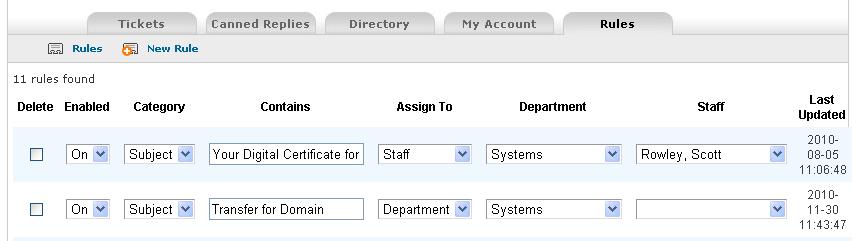
Purpose: Auto-assign tickets that are submitted via email based on their from address or Subject. If a ticket is assigned to a staff member it will automatically also be assigned to the department they are in.
MySQL> Epoch to Unix timestamp
Oct29
2010
Written by Scott Rowley
2010
Written by Scott Rowley
SELECT from_unixtime(epochEntry) FROM table;