...
  • Home
  • Shell
    • Emacs
    • Perl
    • screen
    • sed
  • Ubuntu
    • VNC
  • Web Development
    • Javascript
    • Joomla
    • MySQL
    • osTicket
  • Windows
    • Gimp
KEEP IN TOUCH

Most Popular

  • osTickets > Reports v4.1 (11805)
  • HTPC > Setup Windows 7 as a Media Center with XBMC (6369)
  • osTicket > Auto-Assignment Rules (3602)
  • osTicket > View headers for original email message (2331)
  • Ubuntu 10.10 VNC Login Screen (2161)

Posts in category osTicket

osTicket > Alert Department on Ticket Transfer

Aug11
2011
Leave a Comment Written by Scott Rowley

Ok this isn’t as nice as my normal MODs, its a bit clunky since its all statically written but it should do the trick nonetheless. This has only been tested right now on 1.6RC5, please let me know if you have success on 1.6ST with it and I’ll update this note. Cheers!

Purpose: When transferring a ticket to another department, the new department will receive an email alerting them to the assignment.

include/class.ticket.php
Inside the function transfer, under ‘global $cfg;’ Add the following:

$sql = 'SELECT email,dept_name FROM ost_email LEFT JOIN ost_department on ost_email.email_id=ost_department.email_id WHERE ost_department.dept_id='.$deptId;
        print $sql;
        $result = mysql_query($sql) or die(mysql_error());

        while($row = mysql_fetch_array($result)){
        echo "Department email is " .$row['email'];
        $ticketNumber=$this->getId();
        $to = $row['email'];
        $deptName = $row['dept_name'];
        $subject = "Ticket [#$ticketNumber] Assigned";
        $message = "$deptName,\n\nTicket #$ticketNumber has been assigned to you.\n\nhttp://YOUR_DOMAIN.EXT/scp/tickets.php?id=$ticketNumber";

        $headers  = "From: FROM_EMAIL@YOUR_DOMAIN\r\n";
        $headers .= "Reply-To: no-reply@YOUR_DOMAIN\r\n";
        $headers .= "X-Mailer: PHP\" . phpversion() . \"\r\n";

        mail($to, $subject, $message, $headers);
        }

If there is enough desire for it I may some day add it into the template database for emails and such but right now this set in there statically was enough for me. As always let me know if you have any questions or concerns.

ajax loader
Tagged alert, department, email, ticket, transfer
SHARE THIS Twitter Facebook Delicious StumbleUpon E-mail

osTickets > Reports v4.1

Jun13
2011
227 Comments Written by Scott Rowley

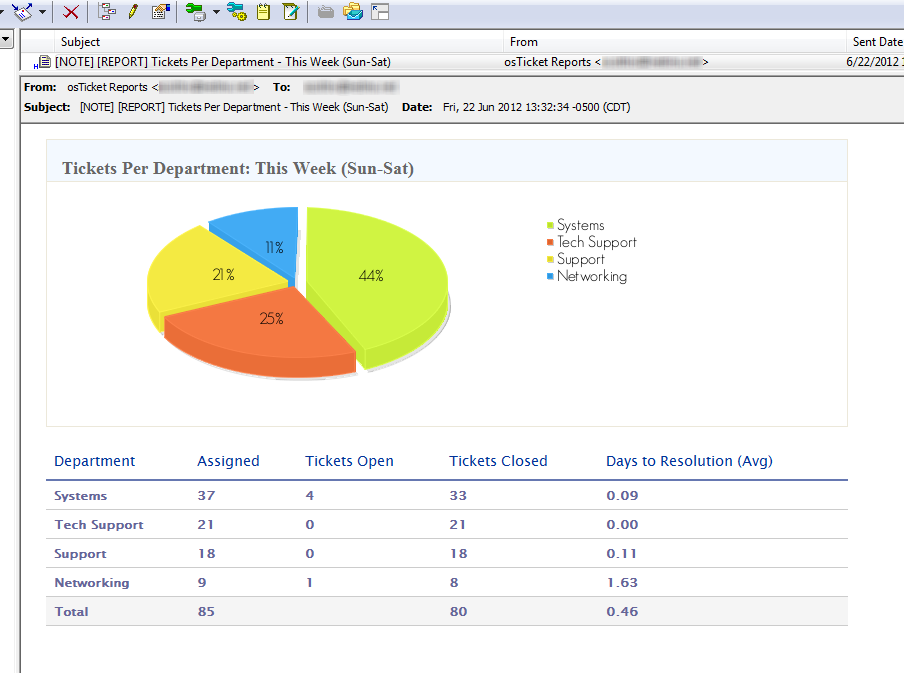
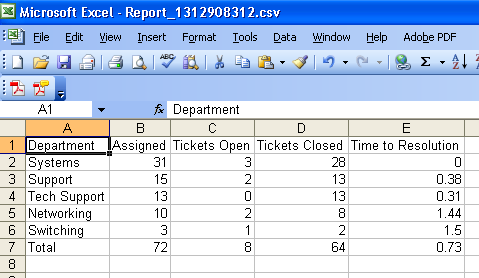
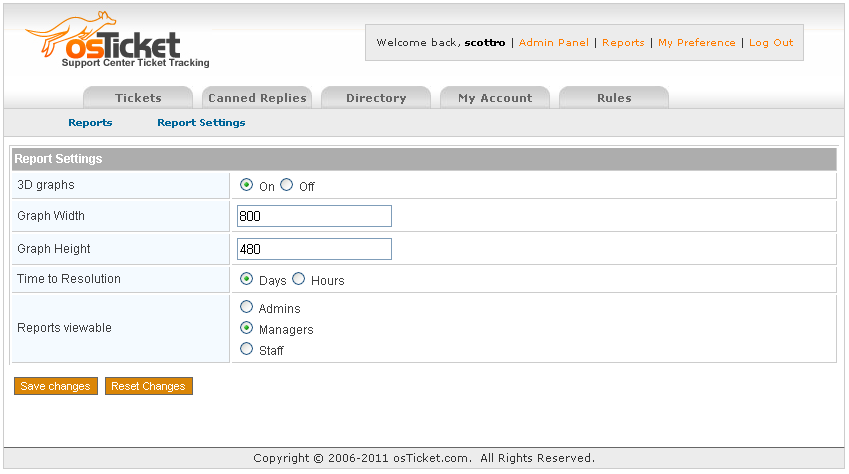
Ok, so after being on the osTicket forum since July 2009 I’ve noticed that one big MOD that everyone wants and never fully gets is reporting. The following is my stab at it.

This MOD has been implemented and tested on 1.6ST and 1.6RC5, please let me know if you run into any issues.

Note: For version 3.3+ you will need to create a scp/reports folder (and make sure its writable by Apache) and place the image (csv.png) into the scp/images folder.

Requirements: MySQL 5

Note: Reports v2.4+ is compatible with Internet Explorer.
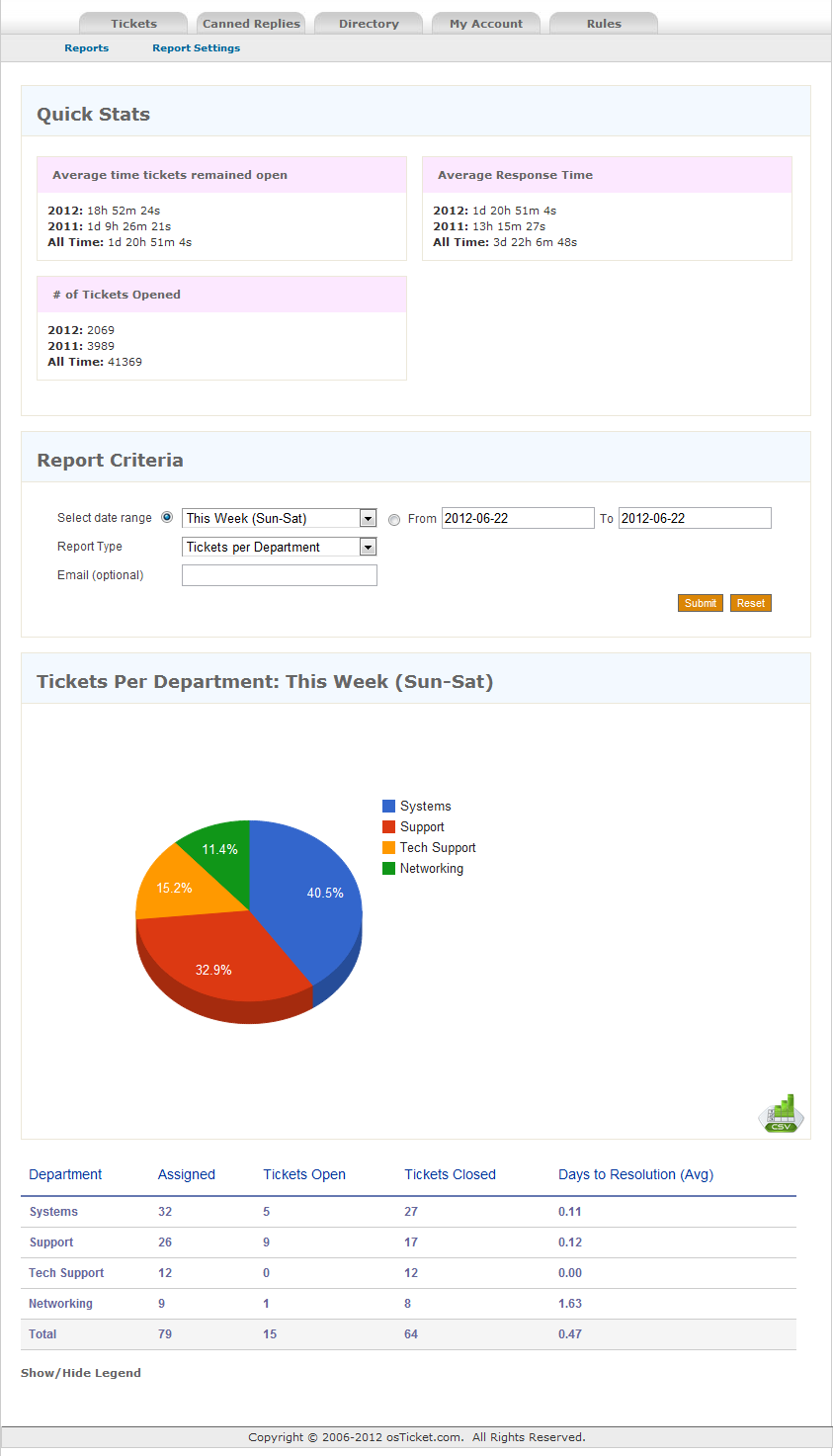
osTickets Reports osTickets Reports
osTickets Reports
READ MORE »

ajax loader
Tagged date_add, date_format, date_sub, day, department, interval, mod, modification, month, MySQL, php, report, reports, staff, year
SHARE THIS Twitter Facebook Delicious StumbleUpon E-mail

osTicket > View headers for original email message

May25
2011
14 Comments Written by Scott Rowley

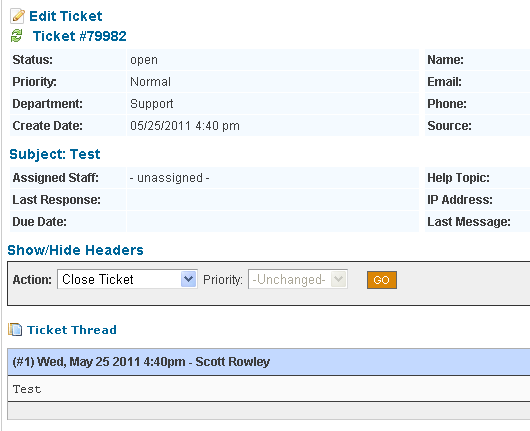
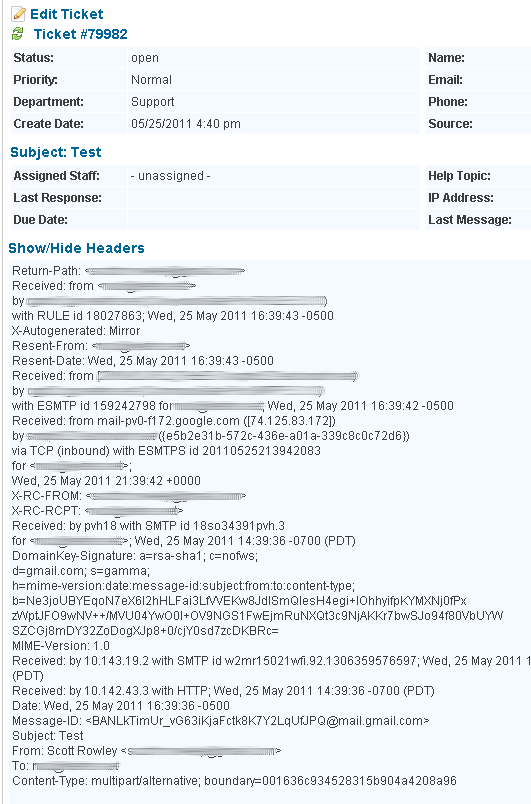
This MOD will allow you to view the original email message headers. The headers also take alot of screen space so we have them “hidden” by default but you can click a link to expand and view them.

1.6ST: If you have not yet modified include/staff/viewticket.inc.php or scp/js/scp.js then you can simply download the following files and replace them. As always, make backups of your local files first.
Download

Hidden Shown
Hidden headers Shown headers

READ MORE »

ajax loader
Tagged address, email, header, headers, hide, Javascript, mod, modification, original, show, ticket
SHARE THIS Twitter Facebook Delicious StumbleUpon E-mail

osTicket > Auto-Assignment Rules

Apr06
2011
36 Comments Written by Scott Rowley

The following is a MOD that I wanted to have for work and I noticed that several people have requested it in different threads on the forum over the years. This has been tested and is functional with 1.6RC5 AND 1.6ST
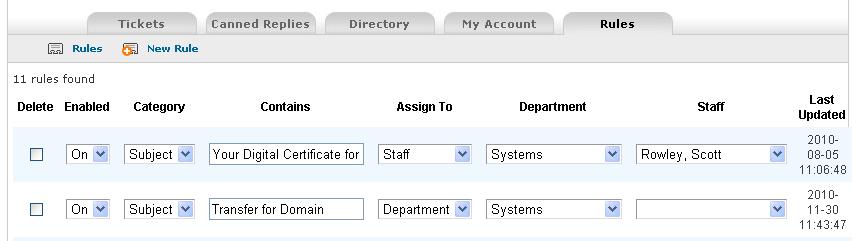
osTicket Auto-Assignment Rules

Purpose: Auto-assign tickets that are submitted via email based on their from address or Subject. If a ticket is assigned to a staff member it will automatically also be assigned to the department they are in.

READ MORE »

ajax loader
Posted in MySQL - Tagged assign, auto, mod, modification, php, ticket
SHARE THIS Twitter Facebook Delicious StumbleUpon E-mail

osTicket > Send reply to alternate/additional email address(es).

Nov09
2010
71 Comments Written by Scott Rowley

I’m setting up another install of osTickets for another department (that needs a whole other server). In the process it was requested that they be able to change who the response address is incase they need to send it along to someone else or in order to include multiple addresses. The following is a simple MOD I came up with that seems to work as desired. As always please let me know if you have any questions or notice any problems.
This has been implemented with 1.6RC and 1.6ST and both are functional with the exact same code.

Note: This is for use with sending mail via the PHP mail function and is not intended or coded for use with SMTP sending.

Note: I have at least one user reporting that this MOD does not work for them running Windows 2008 R2 with SP1 on PHP 5.3.6. We are in the process of troubleshooting it.

include/class.ticket.php
Inside the postResponse function, just before the $sql variable add the following:

            $send_to = $_POST['send_to'];
            $cc_to = $_POST['cc_to'];
            $bcc_to = $_POST['bcc_to'];
            $SENT = "To: $send_to\nCC: $cc_to\nBCC: $bcc_to\n\n";
            $response = "$SENT$response";

Now find the following (still inside postResponse):

$body = str_replace('%response',$response,$body);

And below that line add the following line:

$body = str_replace("$SENT",'',$body);

At the bottom of the postResponse function. Find the following code and remove it:

if($email && $email->getId()) {
                    $email->send($this->getEmail(),$subj,$body,$file);
                }

Now replace it with:

 // Just in case they wiped out the send address we still need to make sure it gets somewhere.
                if($_POST['send_to']){
                    $email->send($_POST['send_to'],$subj,$body,$file);
                    }else{
                    $email->send($this->getEmail(),$subj,$body,$file);
                }

Now we need to setup the actual behind the scenes emailing:
include/class.email.php
Find the following

$to=preg_replace("/(\r\n|\r|\n)/s",'', trim($to));

and just after that add:

// Make sure that tickets is sending via php mail function not smtp or this will not work.
        $CC = $_POST['cc_to'];
        $BCC = $_POST['bcc_to'];

Then just a bit further down we need to add to the headers of the email:

$headers = array ('From' => $from,
                          'To' => $to,
                          'Subject' => $subject,
                          'Message-ID' =>'<'.Misc::randCode(6).''.time().'-'.$this->getEmail().'>',
                          'X-Mailer' =>'osTicket v 1.6',
                          'Content-Type' => 'text/html; charset="UTF-8"'
                          );

For ease of modding just remove all of that and replace it with this:

$headers = array ('From' => $from,
                          'To' => $to,
                          'Bcc' => $BCC,
                          'CC' => $CC,
                          'Subject' => $subject,
                          'Message-ID' =>'<'.Misc::randCode(6).''.time().'-'.$this->getEmail().'>',
                          'X-Mailer' =>'osTicket v 1.6',
                          'Content-Type' => 'text/html; charset="UTF-8"'
                          );

Ok, thats the functionality behind it all, now we just need to add the ability to use it…

include/staff/viewticket.inc.php
Search for the following:

<input type="hidden" name="a" value="reply">

Now just below that line add the following code:

To:<input type="text" name="send_to" value="<?=$ticket->getEmail()?>">
CC: <input type="text" name="cc_to" >
BCC: <input type="text" name="bcc_to" >

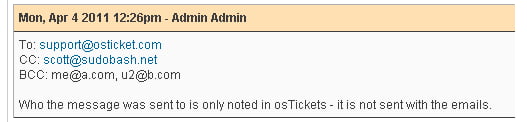
The following picture shows the “To”, “CC” and “BCC” boxes that allows for changing or adding to the email address to send to. This is automatically filled in with the original email address of the ticket submitter. You can send to multiple email addresses by separating the emails with a comma (bob@example.com, bob2@example.com). Its also user proof… if someone wipes out the email address and doesn’t enter in anything then it will default to the original email address.
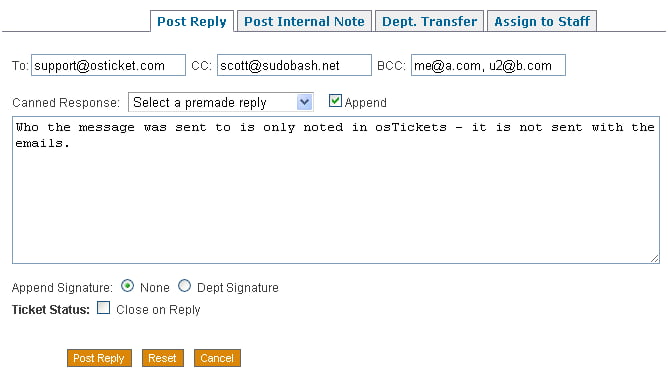
Well thats very nice but if we don’t note who we sent it to then we could be getting very confused. Please let us know where we sent what responses to. This note is added to the response database entry but is stripped before emailing the response to the customer.
ajax loader
Tagged additional, address, alternate, email, mail, mod, reply, send, ticket
SHARE THIS Twitter Facebook Delicious StumbleUpon E-mail

osTicket > Age of Tickets

Oct26
2010
22 Comments Written by Scott Rowley

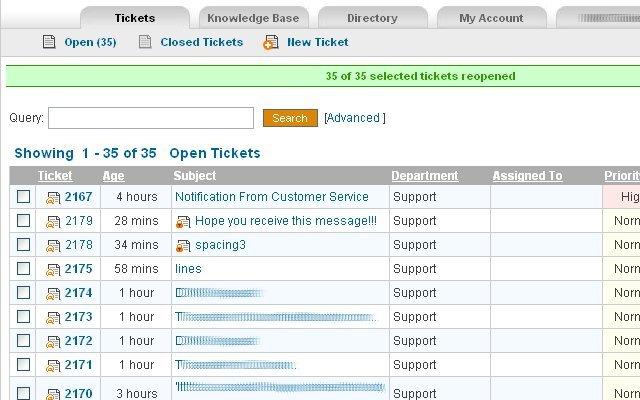
This MOD will add the "Age" column to your tickets table
Ex:
Example
include/staff/tickets.inc.php
Replace the original $sortOptions with the following:

$sortOptions=array('date'=>'ticket.created','ID'=>'ticketID','pri'=>'priority_urgency','dept'=>'dept_name','ass'=>'firstname','timeopen'=>'created');

Replace the original $qselect line with the following:

$qselect = 'SELECT DISTINCT ticket.ticket_id,lock_id,ticketID,ticket.dept_id,ticket.staff_id,subject,name,ticket.email,dept_name,staff.firstname,staff.lastname '.
 ',ticket.status,ticket.source,isoverdue,ticket.created,pri.*,CASE WHEN status = "open" THEN FLOOR(TIME_TO_SEC(TIMEDIFF(now(),ticket.created))/60) ELSE FLOOR(TIME_TO_SEC(TIMEDIFF(ticket.closed,ticket.created))/60) END AS timeopen,count(attach.attach_id) as attachments ';
$qfrom=' FROM '.TICKET_TABLE.' ticket LEFT JOIN '.DEPT_TABLE.' dept ON ticket.dept_id=dept.dept_id '.
 ' LEFT JOIN '.STAFF_TABLE.' staff ON ticket.staff_id=staff.staff_id';

On my version I removed the "Created" column as I felt it was no longer needed with an "Age" column replacing it:

New Code! This fixed the issue with the >35 days (50339 MySQL time issue).

<!--<td align="center" nowrap><?=Format::db_date($row['created'])?></td>-->
<?
$ticket_id=$row['ticket_id'];

 $sql = mysql_query("SELECT UNIX_TIMESTAMP(created) FROM ost_ticket WHERE ticket_id=$ticket_id");
 $created_row = mysql_fetch_array($sql);
 $created = $created_row['UNIX_TIMESTAMP(created)'];

 // closed ticket correct age
if ($status=='closed')
{
// closed ticket
$sql = mysql_query("SELECT UNIX_TIMESTAMP(closed) FROM ost_ticket WHERE ticket_id=$ticket_id");
$closed_row = mysql_fetch_array($sql);
$closed = $closed_row['UNIX_TIMESTAMP(closed)'];
$diff = $closed - $created;
}
else
{
$now=date(U);
$diff = $now - $created;
}

?>
<td class="nohover" align="center" style="color:<?$color="#33FF66"; $old = round($diff / 86400); if ($old >= 4){$color="red"; print ($color);} ?> ">
 <?
 $diff = round($diff / 60);
 $min = "min";
 $mins = "mins";
 $hours = "hours";
 $hour = "hour";
 $day = "day";
 $days = "days";
 if ( $diff <= 1 ){
 print ($diff . " " . $min);
 }elseif ( $diff > 1 && $diff <= 59 ){
 print ($diff . " " . $mins);
 }elseif ( $diff >= 60 && $diff <= 119 ){
 $diff = round($diff / 60);
 print (1 . " " . $hour);
 }elseif ( $diff >= 120 && $diff <= 1439 ){
 $diff = round($diff / 60);
 print ($diff . " " . $hours);
 }elseif ( $diff >= 1440 && $diff <= 2879 ){
 print (1 . " " . $day);
 }elseif ( $diff >= 2880 ){
 $diff = round($diff / 1440);
 print ($diff . " " . $days);
 }else {};
 ?>
 </td>

Around the lines in 385 or so you’ll have several th (table headers). You’ll need to add in the following where you want it to show up in the table. (and make sure to comment out your Date column as well or everything will be off by a column)

<th width='70px'>
<a href="tickets.php?sort=timeopen&order=<?=$negorder?><?=$qstr?>" title="Sort By Age <?=$negorder?>">Age</a></th>

Feel free to ask questions, thanks.

ajax loader
Tagged mod, modification, ticket
SHARE THIS Twitter Facebook Delicious StumbleUpon E-mail

osTicket > Assigned To column

Oct26
2010
32 Comments Written by Scott Rowley

This is a variation on webpragmatists original "Assigned To" MOD as seen on the osTicket forum.

If you haven’t already modified the following files you can simply put in place the files from the following zip archive:

include/staff/ticketcs.inc.php
include/class.ticket.php
scp/tickets.php

Get the files:
osTickets 1.6ST – Show ‘Assigned To’ column
Make sure to check file permissions once you’ve copied the files into place.

assignedTo

The following is what I have for all of my entries. I will include one line prior to the code so you can search for where to enter it.

include/staff/tickets.inc.php
(Remember to comment out the original sortOptions)

//I admit this crap sucks...but who cares??
$sortOptions=array('date'=>'ticket.created','ID'=> 'ticketID','pri'=>'priority_urgency','dept'=>'dept_name','ass'=>'firstname');
//$sortOptions=array('date'=>'ticket.created','ID'=>'ticketID','pri'=>'priority_urgency','dept'=>'dept_name');

(Remember to comment out the first entry for qselect and qfrom)

$pagelimit=$pagelimit?$pagelimit:PAGE_LIMIT; //true default...if all fails.
$page=($_GET['p'] && is_numeric($_GET['p']))?$_GET['p']:1;

$qselect = 'SELECT DISTINCT ticket.ticket_id,lock_id,ticketID,ticket.dept_id,ticket.staff_id,subject,name,ticket.email,dept_name,staff.firstname,staff.lastname '.
 ',ticket.status,ticket.source,isoverdue,ticket.created,pri.*,count(attach.attach_id) as attachments ';
$qfrom=' FROM '.TICKET_TABLE.' ticket LEFT JOIN '.DEPT_TABLE.' dept ON ticket.dept_id=dept.dept_id '.
//       ' LEFT JOIN '.TICKET_PRIORITY_TABLE.' pri ON ticket.priority_id=pri.priority_id '.
//       ' LEFT JOIN '.TICKET_LOCK_TABLE.' tlock ON ticket.ticket_id=tlock.ticket_id AND tlock.expire>NOW() '.
 ' LEFT JOIN '.STAFF_TABLE.' staff ON ticket.staff_id=staff.staff_id';
 <a href="tickets.php?sort=dept&order=<?=$negorder?><?=$qstr?>" title="Sort By Category <?=$negorder?>">Department</a></th>
 <th width="150" ><a href="tickets.php?sort=ass&order=<?=$negorder?><?=$qstr?>" title="Sort By Assignee <?=$negorder?>">Assigned To</a></th>
<td nowrap><?=($row['firstname']) ? $row['firstname'] : '& nbsp;';?> <?=($row['lastname']) ? $row['lastname'] : '';?></td>

*NOTE* Make sure you remove the space between the & and the nbsp; or your space will not work and your cell entry will look goofy.

You should now be able to refresh your Ticket page and have a nice "Assigned To" column. Give it a go!

Now you may notice that after you close a ticket that is assigned to someone that assignment gets removed. I have found this undesirable so we’ll edit the following

include/class.ticket.php
remove staff_id=0 from the following line:

$sql= 'UPDATE '.TICKET_TABLE.' SET status='.db_input('closed').',isoverdue=0,duedate=NULL,updated=NOW(),closed=NOW() '.

This will still make the ticket show up under "My Tickets" (even when closed) in order to get it to stop doing that (if you desire), then change the following entry from:
include/staff/tickets.inc.php

$qwhere.=' AND ticket.staff_id='.db_input($staffId);

to:

$qwhere.=' AND ticket.status="open" AND ticket.staff_id='.db_input($staffId);

You’ll also need to change the following (otherwise it will count that you have tickets assigned but won’t list them thus confusing everyone).
scp/tickets.php

'LEFT JOIN '.TICKET_TABLE.' assigned ON assigned.ticket_id=ticket.ticket_id AND assigned.staff_id='.db_input($thisuser->getId());

To:

'LEFT JOIN '.TICKET_TABLE.' assigned ON assigned.ticket_id=ticket.ticket_id AND ticket.status=\'open\' AND assigned.staff_id='.db_input($thisuser->getId());
ajax loader
Tagged assigned, mod, modification, ticket
SHARE THIS Twitter Facebook Delicious StumbleUpon E-mail

osTicket > Assigned To AND Age of Tickets

Oct26
2010
13 Comments Written by Scott Rowley

"Assigned To" is a variation on webpragmatists original "Assigned To" MOD as seen on the osTicket forum.
"Age of Tickets" is sudobash.net original coding
http://www.sudobash.net/images/age_assigned.png

include/staff/tickets.inc.php
Remember to comment out the original sortOptions

//I admit this crap sucks...but who cares??
$sortOptions=array('date'=>'ticket.created','ID'=> 'ticketID','pri'=>'priority_urgency','dept'=>'dept_name','ass'=>'firstname','timeopen'=>'timeopen');
//$sortOptions=array('date'=>'ticket.created','ID'=>'ticketID','pri'=>'priority_urgency','dept'=>'dept_name');

Remember to comment out the first entry for $qselect and $qfrom

$qselect = 'SELECT DISTINCT ticket.ticket_id,lock_id,ticketID,ticket.dept_id,ticket.staff_id,subject,name,ticket.email,dept_name,staff.firstname,staff.lastname '.',ticket.status,ticket.source,isoverdue,ticket.created,pri.*,CASE WHEN status = "open" THEN FLOOR(TIME_TO_SEC(TIMEDIFF(now(),ticket.created))/60) ELSE FLOOR(TIME_TO_SEC(TIMEDIFF(ticket.closed,ticket.created))/60) END AS timeopen,count(attach.attach_id) as attachments ';
$qfrom=' FROM '.TICKET_TABLE.' ticket LEFT JOIN '.DEPT_TABLE.' dept ON ticket.dept_id=dept.dept_id '.
 ' LEFT JOIN '.STAFF_TABLE.' staff ON ticket.staff_id=staff.staff_id';

Place this with the other table headers (wherever you want it to show up in the table)

<th width="150" ><a href="tickets.php?sort=ass&order=" title="Sort By Assignee ">Assigned To</a></th>

And again for the Age column

<a href="tickets.php?sort=timeopen&order=<?=$negorder?><?=$qstr?>" title="Sort By Age <?=$negorder?>">Age</a></th>

On this next one you need to decide whether or not you want the Age of Tickets column to be in color or not. Take a look at the examples on the following links then insert one of the two following entries:
No Color Example
Color Example

NO COLOR

<!--<td align="center" nowrap><?=Format::db_date($row['created'])?></td>-->
<?
 $ticket_id=$row['ticket_id'];

 $sql = mysql_query("SELECT UNIX_TIMESTAMP(created) FROM ost_ticket WHERE ticket_id=$ticket_id");
 $created_row = mysql_fetch_array($sql);
 $created = $created_row['UNIX_TIMESTAMP(created)'];

 $now=date(U);
 $diff = $now - $created;

?>

 <td class="nohover" align="center" style="color:<?$color="#33FF66"; $old = round($diff / 86400); if ($old >= 4){$color="red"; print ($color);} ?>" >
 <?
 $diff = round($diff / 60);
 $min = "min";
 $mins = "mins";
 $hours = "hours";
 $hour = "hour";
 $day = "day";
 $days = "days";
 if ( $diff <= 1 ){
 print ($diff . " " . $min);
 }elseif ( $diff > 1 && $diff <= 59 ){
 print ($diff . " " . $mins);
 }elseif ( $diff >= 60 && $diff <= 119 ){
 $diff = round($diff / 60);
 print (1 . " " . $hour);
 }elseif ( $diff >= 120 && $diff <= 1439 ){
 $diff = round($diff / 60);
 print ($diff . " " . $hours);
 }elseif ( $diff >= 1440 && $diff <= 2879 ){
 print (1 . " " . $day);
 }elseif ( $diff >= 2880 ){
 $diff = round($diff / 1440);
 print ($diff . " " . $days);
 }else {};
 ?>
 </td>
 

WITH COLOR

<!--<td align="center" nowrap></td>-->        <td class="nohover" align="center" style="background-color:<?$color="#33FF66"; $diff=$row['timeopen']; $diff = round($diff / 1440); if ($diff <= 1){print ($color);}elseif ($diff >= 2 && $diff < 4){$color="#FFFF66"; print ($color);}elseif ($diff >= 4){$color="#FF745A"; print ($color);} ?>" >
 <?
 $diff =$row['timeopen'];
 $min = "min";
 $mins = "mins";
 $hours = "hours";
 $hour = "hour";
 $day = "day";
 $days = "days";
 if ( $diff <= 1 ){
 print ($diff . " " . $min);
 }elseif ( $diff >  1 && $diff <= 59 ){
 print ($diff . " " . $mins);
 }elseif ( $diff >= 60 && $diff <= 119 ){
 $diff = round($diff / 60);
 print (1 . " " . $hour);
 }elseif ( $diff >= 120 && $diff <= 1439 ){
 $diff = round($diff / 60);
 print ($diff . " " . $hours);
 }elseif ( $diff >= 1440 && $diff <= 2879 ){
 print (1 . " " . $day);
 }elseif ( $diff >= 2880 && $diff < 50339 ){
 $diff = round($diff / 1440);
 print ($diff . " " . $days);
 }elseif ( $diff == 50339 ){
 print ("> 35 days");
 }else {};
 ?>
 </td>
 

*NOTE* Make sure you remove the space between the & and the nbsp; or your space will not work and your cell entry will look goofy. Also make sure to comment out your "Date" – you won’t need it now that you know the Age.

You should now be able to refresh your Ticket page and have a nice "Assigned To" column along with the "Age of Tickets" column.

Now you may notice that after you close a ticket that is assigned to someone that assignment gets removed. I have found this undesirable so we’ll edit the following

include/class.ticket.php
remove staff_id=0 from the following line:

sql= 'UPDATE '.TICKET_TABLE.' SET status='.db_input('closed').',isoverdue=0,duedate="NULL",updated=NOW(),closed=NOW() '.

This will still make the ticket show up under "My Tickets" in order to get it to stop doing that (if you desire), then change the following entry from:
include/staff/tickets.inc.php

$qwhere.=' AND ticket.staff_id='.db_input($staffId);

to:

$qwhere.=' AND ticket.status="open" AND ticket.staff_id='.db_input($staffId);

You’ll also need to change the following (otherwise it will count that you have tickets assigned but won’t list them thus confusing everyone).
scp/tickets.php

'LEFT JOIN '.TICKET_TABLE.' assigned ON assigned.ticket_id=ticket.ticket_id AND assigned.staff_id='.db_input($thisuser->getId());

To:

'LEFT JOIN '.TICKET_TABLE.' assigned ON assigned.ticket_id=ticket.ticket_id AND open.status='Open' AND assigned.staff_id='.db_input($thisuser->getId());
ajax loader
Tagged age, assign, assigned, mod, modification, ticket
SHARE THIS Twitter Facebook Delicious StumbleUpon E-mail

osTicket > Change default action

Oct26
2010
Leave a Comment Written by Scott Rowley

If you are like me and like as many shortcuts as possible then you’ll like this next very simple MOD for osTicket.

Standard Install:

Modified default action:

First we want to get rid of the default action altogether as we don’t want to keep it around and have it end up as an alternate action (as it does nothing). Find the following code:

include/staff/viewticket.php

<option value="">Select Action</option>

And comment it out using PHP commenting syntax:

<!--<option value="">Select Action</option>-->

Then just find the action you want (Close Tickets in my example) and cut it from its current location and move it directly underneath your commented out "Select Action" line.

<!--<option value="">Select Action</option>-->
 <?if($thisuser->canCloseTickets()){
 //if you can close a ticket...reopening it is given.
 if($ticket->isOpen()){?>
 <option value="close" <?=$info['do']=='close'?'selected':''?> >Close Ticket</option>
 <?}else{?>
 <option value="reopen" <?=$info['do']=='reopen'?'selected':''?> >Reopen Ticket</option>
 <?}
 }?>

Make sure to get all the required ?> lines or you will run into trouble.

ajax loader
Tagged action, default, mod, modified, ticket
SHARE THIS Twitter Facebook Delicious StumbleUpon E-mail

osTicket > Show “Closed Ticket” note

Oct26
2010
Leave a Comment Written by Scott Rowley

This is a simple mod that you can do in order to tell who closed and reopened a ticket:

include/class.ticket.php
Inside of the function close(){ information just above the return line add the following:

$this->postNote('Ticket Closed');
return (db_query($sql) && db_affected_rows())?true:false;

Then repeat the step down in the function reopen(){

$this->postNote('Re-Opened Ticket');
return (db_query($sql) && db_affected_rows())?true:false;

Now any time someone closes a ticket or reopens a ticket an "Internal Note" will be created stating either "Ticket Closed" or "Re-Opened Ticket" as well as by whom and when.

ajax loader
Tagged closed, mod, modification, ticket
SHARE THIS Twitter Facebook Delicious StumbleUpon E-mail
« Older Entries

Be Heard!

Authors needed! Feel like sharing your tech wisdom with the world? We are looking to expand our writer base and would love to hear from you. We need articles on any relevant technology/software/media/howto/etc (Well...lets at least hold to the legal stuff ;)

Just email scott (at) sudobash (dot) net

Corrections? Questions? Comments?

Find an error?
Everything work out great for you?
Have some feedback?
Like to see something added to the article?

PLEASE leave us a comment after the article and let us know how we are doing, or if something needs corrected, improved or clarified.

Thank you!
- The Management

Sudo Bash Member sites

Des Moines, Iowa Karate Classes
Iowa MMA Tournaments
Iowa SAR

Meta

  • Log in
  • Entries RSS
  • Comments RSS
  • WordPress.org

RSS HowToGeek

  • DIY Digital POV Clock On a Hard Drive Platter
  • How to Disable the Splash Screens in Office (Word, Excel, PowerPoint)
  • How To Resolve Dependencies While Compiling Software on Ubuntu
  • Version Tracking With Subversion (SVN) For Beginners
  • How to Set Up Email Notifications for Your Windows Home Server

RSS TheGeekStuff

  • How to Install GIT for Windows and Create / Clone Remote Repositories
  • 5 Practical Linux fuser Command Examples
  • Linux Memory Management – Virtual Memory and Demand Paging
  • XSS Attack Examples (Cross-Site Scripting Attacks)
  • 10 Things You (and Your Boss) Can Do To Change Your World

RSS LifeHacker

  • Remove Clothing Wrinkles with a Damp Towel [Clothes]
  • Factor in the Convenience Fee Before Charging Income Taxes to Your Credit Card [Taxes]
  • How to Block Annoying Tech Rumors and Movie Spoilers on Your Browser [Annoyances]
  • Use Plastic Shower Caps in the Kitchen to Cover Large Bowls and Leftovers [Clever Uses]
  • Twitter for iOS and Android Updates, Restores Swipe Gestures and Optimizes for Android Tablets [Updates]

EvoLve theme by Blogatize  •  Powered by WordPress Sudo Bash
By Geeks - For Geeks

Back to Top