
 Written by
 The following is a MOD that I wanted to have for work and I noticed that several people have requested it in different threads on the forum over the years. This has been tested and is functional with 1.6RC5 AND 1.6ST
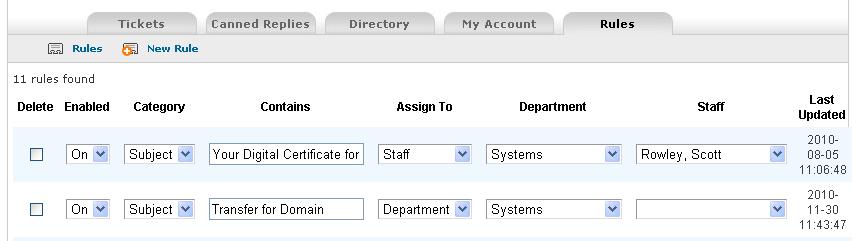
Purpose: Auto-assign tickets that are submitted via email based on their from address or Subject. If a ticket is assigned to a staff member it will automatically also be assigned to the department they are in.
Step 1: Update tickets database with the following;
CREATE TABLE ost_ticket_rules (id TINYINT AUTO_INCREMENT PRIMARY KEY,
isenabled TEXT NOT NULL COLLATE utf8_general_ci,
Category varchar(125) NOT NULL COLLATE utf8_general_ci,
Criteria TEXT NOT NULL COLLATE utf8_general_ci,
Action TEXT NOT NULL COLLATE utf8_general_ci,
Department TEXT NOT NULL COLLATE utf8_general_ci,
Staff TEXT NOT NULL COLLATE utf8_general_ci,
updated DATETIME NOT NULL,
created DATETIME NOT NULL);
Step 2: Create scp/rules.php
<?php
require('staff.inc.php');
$page='';
$answer=null; //clean start.
$nav->setTabActive('rules');
$nav->addSubMenu(array('desc'=>'Rules','href'=>'rules.php','iconclass'=>'premade'));
$nav->addSubMenu(array('desc'=>'New Rule','href'=>'add_rule.php','iconclass'=>'newPremade'));
require_once(STAFFINC_DIR.'header.inc.php');
$query=sprintf("SELECT * FROM ost_ticket_rules;");
$result=mysql_query($query);
// Count table rows
$count=mysql_num_rows($result) or die(mysql_error());;
print "$count rules found";
?>
<table width="100%" border="0" cellspacing="0" cellpadding="0">
<form name="form1" method="POST" action="rules.php">
<tr>
<td>
<table width="100%" border="0" cellspacing="0" cellpadding="5">
<tr>
<!--<td align="center"><strong>ID</strong></td>-->
<td align="center"><strong>Delete</strong></td>
<td align="center"><strong>Enabled</strong></td>
<td align="center"><strong>Category</strong></td>
<td align="center"><strong>Contains</strong></td>
<td align="center"><strong>Assign To</strong></td>
<td align="center"><strong>Department</strong></td>
<td align="center"><strong>Staff</strong></td>
<td align="center"><strong>Last Updated</strong></td>
</tr>
<?php
$class = 'row1';
$counter = 0;
while($rows=mysql_fetch_array($result)){
?>
<tr class="<?=$class?>">
<!--<td align="center"><?=$rows['id']; ?></td>-->
<td align="center"><input type="checkbox" name="deleteRule[]" value="<?=$rows['id']; ?>"></td>
<td align="center"><select name="isenabled[]"><option value="on" <?if($rows['isenabled'] == "on"){print "SELECTED";}?> >On</option><option value="off" <?if($rows['isenabled'] == "off"){print "SELECTED";}?>>Off</option></select></td>
<td align="center">
<select name="Category[]"><option value="subject" <? if($rows['Category'] == "subject"){print "SELECTED";}?>>Subject</option><option value="email" <? if($rows['Category'] == "email"){print "SELECTED";}?>>Email</option></select>
</td>
<td align="center"><input name="Criteria[]" type="text" id="Criteria" value="<? echo $rows['Criteria']; ?>"></td>
<td align="center">
<select name="Action[]"><option value=""> </option><option value="deptId" <? if($rows['Action'] == "deptId"){print "SELECTED";}?>>Department</option><option value="staffId" <? if($rows['Action'] == "staffId"){print "SELECTED";}?>>Staff</option></select>
</td>
<td align="center">
<select name="Department[]">
<option value=0> </option>
<?
$depts= db_query('SELECT dept_id,dept_name FROM '.DEPT_TABLE.'');
while (list($deptId,$deptName) = db_fetch_row($depts)){?>
<option value="<?=$deptId?>" <? if($deptId == $rows['Department']){print SELECTED;}?>><?=$deptName?></option>
<?}?>
</select>
</td>
<td align="center">
<select id="Staff" name="Staff[]" >
<option value="0" selected="selected"> </option>
<?
$sql=' SELECT staff_id,CONCAT_WS(", ",lastname,firstname) as name FROM '.STAFF_TABLE.
' WHERE isactive=1 AND onvacation=0 ';
$depts= db_query($sql.' ORDER BY lastname,firstname ');
while (list($staffId,$staffName) = db_fetch_row($depts)){?>
<option value="<?=$staffId?>" <? if($staffId == $rows['Staff']){print SELECTED;}?>><?=$staffName?></option>
<?}?>
</select>
</td>
<td align="center"><? echo $rows['updated']; ?></td>
</tr>
<?php
$class = ($class =='row2') ?'row1':'row2';
$counter = $counter +1;
}
?>
<tr>
<td colspan="7" align="right"><input type="submit" name="Submit" class="button" value="Submit"></td>
</tr>
</table>
</td>
</tr>
</form>
</table>
<?php
$ISENABLED = $_POST['isenabled'];
$CATEGORY = $_POST['Category'];
$CRITERIA = $_POST['Criteria'];
$ACTION = $_POST['Action'];
$DEPARTMENT = $_POST['Department'];
$STAFF = $_POST['Staff'];
$DELETE = $_POST['deleteRule'];
// Check if button name "Submit" is active, do this
if(isset($_POST['Submit'])){
for($i=0;$i<$count;$i++){
$sql1="UPDATE ost_ticket_rules SET isenabled='$ISENABLED[$i]', Category='$CATEGORY[$i]', Criteria='$CRITERIA[$i]', Action='$ACTION[$i]', Department='$DEPARTMENT[$i]', Staff='$STAFF[$i]', updated=NOW() WHERE id='$id[$i]'";
$result=mysql_query($sql1);
if(isset($DELETE[$i])){
$sql2="DELETE from ost_ticket_rules WHERE id='$DELETE[$i]'";
$result2=mysql_query($sql2);
}
}
?>
<SCRIPT language="JavaScript">
<!--
window.location="rules.php";
//-->
</SCRIPT><?
}
mysql_close();
require_once(STAFFINC_DIR.'footer.inc.php');
?>
Step 3: Create scp/add_rule.php
<?php
require('staff.inc.php');
$page='';
$answer=null; //clean start.
$nav->setTabActive('rules');
$nav->addSubMenu(array('desc'=>'Rules','href'=>'rules.php','iconclass'=>'premade'));
$nav->addSubMenu(array('desc'=>'New Rule','href'=>'add_rule.php','iconclass'=>'newPremade'));
require_once(STAFFINC_DIR.'header.inc.php');
?>
<table width="100%" border="0" cellspacing="1" cellpadding="0">
<form name="form1" method="POST" action="add_rule.php">
<tr>
<td>
<table width="100%" border="0" cellspacing="1" cellpadding="5">
<tr>
<!--<td align="center"><strong>ID</strong></td>-->
<td align="center"><strong>Enabled</strong></td>
<td align="center"><strong>Category</strong></td>
<td align="center"><strong>Contains</strong></td>
<td align="center"><strong>Assign To</strong></td>
<td align="center"><strong>Department</strong></td>
<td align="center"><strong>Staff</strong></td>
</tr>
<tr>
<td width="50" align="center"><select name="isenabled"><option value="on">On</option><option value="off">Off</option></select></td>
<td align="center">
<select name="Category"><option value="subject">Subject</option><option value="email">Email</option></select>
</td>
<td align="center"><input name="Criteria" type="text" id="Criteria"></td>
<td align="center"><select name="Action"><option value=""> </option><option value="deptId">Department</option><option value="staffId" >Staff</option></select></td>
<td align="center">
<select name="Department">
<option value=0> </option>
<?
$depts= db_query('SELECT dept_id,dept_name FROM '.DEPT_TABLE.'');
while (list($deptId,$deptName) = db_fetch_row($depts)){?>
<option value="<?=$deptId?>" ><?=$deptName?></option>
<?}?>
</select>
</td>
<td align="center">
<select id="Staff" name="Staff" >
<option value="0" selected="selected"> </option>
<?
$sql=' SELECT staff_id,CONCAT_WS(", ",lastname,firstname) as name FROM '.STAFF_TABLE.
' WHERE isactive=1 AND onvacation=0 ';
$depts= db_query($sql.' ORDER BY lastname,firstname ');
while (list($staffId,$staffName) = db_fetch_row($depts)){?>
<option value="<?=$staffId?>" ><?=$staffName?></option>
<?}?>
</select>
</td>
<tr>
<td colspan="7" align="right"><input type="submit" name="Submit" class="button" value="Submit"></td>
</tr>
</table>
</td>
</tr>
</form>
</table>
<?php
$ISENABLED = $_POST['isenabled'];
$CATEGORY = $_POST['Category'];
$CRITERIA = $_POST['Criteria'];
$ACTION = $_POST['Action'];
$DEPARTMENT = $_POST['Department'];
$STAFF = $_POST['Staff'];
// Check if button name "Submit" is active, do this
if(isset($_POST['Submit'])){
$sql="INSERT INTO ost_ticket_rules (isenabled, Category, Criteria, Action, Department, Staff, updated, created)
VALUES ('$_POST[isenabled]','$_POST[Category]','$_POST[Criteria]','$_POST[Action]','$_POST[Department]','$_POST[Staff]', NOW(), NOW())";
if (!mysql_query($sql))
{
die('Error: ' . mysql_error());
}
echo "Rule added";
}
?>
<!--<SCRIPT language="JavaScript">
<!--
window.location="rules.php";
//-->
</SCRIPT><?
mysql_close();
require_once(STAFFINC_DIR.'footer.inc.php');
?>
Step 4: Modify include/class.ticket.php
Remove the following
//Last minute checks
$priorityId=$priorityId?$priorityId:$cfg->getDefaultPriorityId();
$deptId=$deptId?$deptId:$cfg->getDefaultDeptId();
$ipaddress=$var['ip']?$var['ip']:$_SERVER['REMOTE_ADDR'];
//We are ready son…hold on to the rails.
$extId=Ticket::genExtRandID();
$sql= 'INSERT INTO '.TICKET_TABLE.' SET created=NOW() '.
',ticketID='.db_input($extId).
',dept_id='.db_input($deptId).
',priority_id='.db_input($priorityId).
',email='.db_input($var['email']).
',name='.db_input(Format::striptags($var['name'])).
',subject='.db_input(Format::striptags($var['subject'])).
',topic='.db_input(Format::striptags($topicDesc)).
',phone='.db_input($var['phone']).
',phone_ext='.db_input($var['phone_ext']?$var['phone_ext']:'').
',ip_address='.db_input($ipaddress).
',source='.db_input($source);
and replace with
// BEGIN - sudobash.net Auto-Assignment Rules MOD //
//Last minute checks
$priorityId=$priorityId?$priorityId:$cfg->getDefaultPriorityId();
$deptId=$deptId?$deptId:$cfg->getDefaultDeptId();
$ipaddress=$var['ip']?$var['ip']:$_SERVER['REMOTE_ADDR'];
$subject=(Format::striptags($var['subject']));
$email=($var['email']);
$qry = sprintf("SELECT * FROM ost_ticket_rules;");
$result=mysql_query($qry);
while ( $row = mysql_fetch_assoc($result)){
$isenabled=$row['isenabled'];
$Category=$row['Category'];
$Criteria=$row['Criteria'];
$Action=$row['Action'];
$Department=$row['Department'];
$Staff=$row['Staff'];
if( "$isenabled" == "on" )
{
if( "$Category" == "subject" )
{
if (preg_match("/$Criteria/i", $subject))
{
if( "$Action" == "deptId" )
{
$deptId=$Department;
}
elseif( "$Action" == "staffId" )
{
$staffId=$Staff;
$staffId=preg_replace( '/\n/', '', trim($staffId) );
$qry = sprintf("SELECT dept_id FROM `ost_staff` WHERE staff_id=$Staff;");
$result=mysql_query($qry);
while ( $row = mysql_fetch_assoc($result)){
$deptId=$row['dept_id'];
}
}
}
}
elseif ( "$Category" == "email" )
{
if (preg_match("/$Criteria/i", $email))
{
if( "$Action" == "deptId" )
{
$deptId=$Department;
}
elseif( "$Action" == "staffId" )
{
$staffId=$Staff;
$staffId=preg_replace( '/\n/', '', trim($staffId) );
$qry = sprintf("SELECT dept_id FROM `ost_staff` WHERE staff_id=$Staff;");
$result=mysql_query($qry);
while ( $row = mysql_fetch_assoc($result)){
$deptId=$row['dept_id'];
}
}
}
}
}
} // End while loop
//We are ready son…hold on to the rails.
$extId=Ticket::genExtRandID();
$sql= 'INSERT INTO '.TICKET_TABLE.' SET created=NOW() '.
',ticketID='.db_input($extId).
',priority_id='.db_input($priorityId).
',email='.db_input($var['email']).
',name='.db_input(Format::striptags($var['name'])).
',subject='.db_input($subject).
',dept_id='.db_input($deptId).
',staff_id='.db_input($staffId).
',topic='.db_input(Format::striptags($topicDesc)).
',phone='.db_input($var['phone']).
',phone_ext='.db_input($var['phone_ext']?$var['phone_ext']:'').
',ip_address='.db_input($ipaddress).
',source='.db_input($source);
// END - sudobash.net Auto-Assignment Rules MOD //
1.6ST: If you are on 1.6ST then change the topic line above to the below:
',helptopic='.db_input(Format::striptags($topicDesc)).
Step 5: Modify include/class.nav.php
Add the following line wherever in the $tabs lineup you would like to see it (note that you may cause your tabs to overflow if you put it in with the other Admin only tabs).
$tabs['rules']=array('desc'=>'Rules','href'=>'rules.php','title'=>'Rules');
Step 6: Create rules and test
I have this working on both my test server and now my production osTicket server. All this code was copy and pasted direct from my ssh session. If you run into any errors please first check to make sure that you’ve followed the steps in order then make sure that nothing errored out because of copy/paste issues.
I look forward to comments, thank you!
Hi,
Great and cool mod!
I was trying to get this working with the mod “show assigned to-column” (http://sudobash.net/?p=158)
I am not able to set up both mods working at the same time. Modifications added to class.ticket.php do break the site:
“The website encountered an error while retrieving http://xyz.com/admin/tickets.php?id=101. It may be down for maintenance or configured incorrectly.”
Before adding the code I checked the differencies and then just added the necessary lines according to code in this page. but does not work after adding necessary lines. When I restore the old class.ticket.php it works again.
Any tips?
Actually I’ve got both of these MODs implemented myself. Are you running 1.6 ST or 1.6 RC5?
I am running 1.6 ST.
I also tested with clean 1.6 ST and did not work. When necessary changes are done, I can see the Rules-tab and but the page itself is blank.
If it helps, I can do more testing and provide more information if needed.
Hello Scott — I’ve put almost all your mods in and when I put this one in there was a problem. I got a DB Error back to my admin email –
Unknown column ‘topic’ in ‘field list’
Took a look at the code and in your “Remove the code”, line 1396, your’s has “,topic=”, my original code had “,helptopic=”.
To fix it — in your “and replace with” code at line 1457
change: “‘,topic=’.db”
to: ‘,helptopic=’.db
Works like a charm now, hope this helps others ( for you Atte),
Thanks for the mods, you’ve saved me hours,
leon …
zaks.com
Hey Leon, thanks for that! I wonder if this is a difference between 1.6ST and 1.6RC5. I am running RC5 still. I’ll have to check into that when I return to work. Thanks again!
I was doing some testing with this mod and found that I could submit a rule without filling in all the fields for a complete rule and it didn’t tell me that I hadn’t completed it. Of course it’s something you shouldn’t do, but I have “users”. They usually do things they shouldn’t!
I added a bit to the closing end of add_rule.php that checks for that. I’m not wasn’t sure I could put code in here without it getting messed up so I posted it on one of my blogs, if anyone is interested it’s at http://leonzak.com
leon ..
After posting I noted that I was having the same DB error message as Leon was having. Necessary fixes and now I can add rules and it works.
Then I checked Leon’s modifications from his blog about filling the necessary fields but those fixes did again broke the add_rule.php file and I was not able to add any rules.
This section brakes the page:
” // Check if button name “Submit” is active, do this
if(isset($_POST[‘Submit’])){
if($_POST[Criteria]==”) {
…
”
Anyhow thanks to you two both, now our osTicket is again more better equipped 🙂
– Atte
Yea, originally this was just an in house MOD but I decided to go ahead and publish it after I saw some people requesting the MOD. I never had the error checking it it because really its just me that creates the rules anyway. I’ll have to go through it again and add the checks. I’ll post the new code when its ready.
Hello, and thank you for this mod. When I implement the change in class.ticket.php, I get the following error:
Diagnostic-Code: x-unix; PHP Deprecated: Assigning the return value of new byreference is deprecated in
/home/parkerj/public_html/support.classblogs.us/public/include/pear/Mail/mimeDecode.php
on line 335 PHP Deprecated: Assigning the return value of new by reference
is deprecated in
/home/parkerj/public_html/support.classblogs.us/public/include/pear/Mail/smtp.php
on line 322
I am using piping instead of mail fetch if that makes a difference.
Please disregard my previous comment. My issue had to do with helptopic=’.db and this fixed my issue.
Hey Scott,
Great stuff again. Your mods are easy to merge, even with a modded osTicket. I have a question and a suggestion for you:
you might want to loose the hardcoded table names and use constants like the rest of the site, e.g.
/* MOD auto-assign */

define('RULES_TABLE',TABLE_PREFIX.'ticket_rules');

/* END MOD */
Secondly, is there a specific reason you never use the functions provided like db_input() and directly use mysql_query()?
This one actually merged perfectly with the rest of your mods. Tx again for sharing.
Glen,
The latest version of reports (not published yet) has me starting to use the constants instead of hard coded names.
I think I use mysql_query because I didn’t see the point in making and calling a function for something that is already a function. Why make the function db_input when mysql_query is the exact same thing? I never saw the point and I if I see mysql_query() I know exactly what its doing. I don’t have to wonder if db_input has some slight modifications to anything along the way.
I have something I’d like you to take a look at but its not public yet. I’ll email it to you.
I have the pages working (had a slight issue at first, worked past it though), but I can’t get it to auto-assign. I’m not getting any errors either. The rules create fine, tickets simply aren’t assigned to staff.
For instance, I still use the Help Topic “Support”. Now, for testing, I said that any ticket that came in for Support would come to me. So I set Enabled to On, Category to Subject, Contains to “Support”, Assign to Staff, Department to Support, Staff as myself. Now, I would assume that Contains refers to the Subject (if you can change the code to be able to choose Help Topics please let me know how), so I did a test rule saing that if the Subject Contained Support it would assign it to me. Again, if the Category could be set to “Help Topic” and read from the list of topics available this could be more uniform, but anyhow created a test ticket with test in the subject line and Support as the help topic. This of course did not auto assign. So my second test was to create a ticket with Support in the subject line and a different help topic. This did not assign correctly either. My final test was to set the Subject and Help Topic as “Support” and it did not assign either. I’m not sure where to go from here. Any ideas?
What sort of mail environment are you using? I was and am using cron to fetch tickets. Are you perhaps using something else? Its been quite awhile since I looked at this MOD but could it be something with that? Let me know and I’ll investigate further. Also, what version of ostickets are you using?
I’m running OST 1.6ST on CentOS 5.5. I am not using auto cron, nor do I allow for tickets to be created via email. I am only using the web portal’s to create tickets.
I guess overall what I am looking for is to be able to poll my helptopics, maybe put them in a dropdown box, choose one of the helptopics and auto-assign this helptopic to a specific support staff.
nor do I allow for tickets to be created via email.
Ah, thats the problem then, this is intended for email ticket creation:
Purpose: Auto-assign tickets that are submitted via email based on their from address or Subject. If a ticket is assigned to a staff member it will automatically also be assigned to the department they are in.
Wow, my bad. I have the habit of missing key bits of information from time to time. Need to learn to take my time a little more. Thank you for the help!
On a side note, anyway that what I was talking about could be done? To remove the Contains and Category options and put a drop down box with the HelpTopics listed?
Patrick,
That would be pretty much an entire new MOD as all of the above code as far as making the assignments is done through the email to ticket process. Then I’d have to change up the rules.php and add_rule.php pages as well.
At the time being you can view the following on the osTicket forum and decide on something there, otherwise, I wouldn’t be able to get to this for several months as I have 1 major project at work going right now as well as 1 major freelance project not to mention my normal workload and family as well.
Personal Cancer Financial Relief
Cheers!
Hi,
Back again working with this.
I noticed another problem, I cannot add more than one rule, two rules cannot co-exist. When submitting new rule, script generates new id for the new rule but also removes the old rule.
BR,
Atte
Unfortunately the only thing I can recommend here is to reinstall the MOD, it shouldn’t be doing that. You should be able to use the “Add Rule” page to add rules one at a time and they show up under the Rules page.
I got again today time to focus on this…
I opened the rules page, sighed deeply and tried to add a new rule…
and it worked like a charm! 🙂 Last time it just did not add more than one rule.
I haven’t done any changes to fix this, and don’t know what could have broke it, modifications have been done anyhow. But seems that the some nothing which broke this, did also fixit 🙂 Maybe there was some broken byte in the system last time and now it was gone.
hehe, ok cool 🙂
Hey, I’m wondering if there is any way to sort the emails by what email address they are sent to. If not do you know of any workarounds?
How do you want them sorted? You mean into different departments? If you want them sorted into departments then you can do that without any MODding. You just need to setup each department with a separate email address and fetch them separately.
Ok, you my friend get a gold star from me. This is functionality I have been needing for a LONG time. For me worked perfect with 1.6 stable FYI. Thanks so much.
Sweet, glad to hear it! 🙂
Good Day Scott,
Very good mod, got it to work, and is excellent.
Keep up the good work.
Awesome, thanks 🙂
Scott is there a mod that will allow users to authenticate with their AD credentials when creating a new ticket
scott is there a way of getting another text box for users to use , to select their department when creating a new ticket
This mod is almost exactly what I want. I am looking to do auto-assignments, but would like an option to tell the system to auto-rotate through the individuals in the department and assign it to the person with the oldest assign date so that everyone gets their “fair share”. (excluding those on vacation) Is that a possibility?
Anything’s possible with coding 😉 I’ll put it on my list of requested MODs. 🙂
Thanks Scott. That would be great!
Scott , is there a code we can add on the main call logging screen so that users can select their model of device , what type of version they are using ect. is there also a code so that users do not have to enter their names manually but when they enter a letter of ther first name it will automatically sync with active directory and they can then select their name ,
Those would both be custom MODs, I don’t have anything for either of those at present.
I love this mod! works great!
Could it be added to so that when we get an email it looks at the message and if it contains the phrase “Close Job” could it close the job?
or taking it further we have additional fields like serial number. If the message contains S/N# XXXXXX could it look at the message and add that to the appropriate field in the ticket?
Again thanks for your work it is appreciated 🙂
Paul
Paul, I’d like to be able to help you out but seeing as how thats a pretty “customized to you” MOD I really don’t have time to work on it right now. I’ve got a major project going on at work, a second job with something like 13451351235132 tasks, 3 kids, a baby on the way…. and the list goes on 😉 I don’t even think I have time right now to take it on as a commercial MOD request, sorry 🙁
Thanks for the mod in the first place 🙂 If you could answer a couple of Q and point me in the right direction it would be fantastic! Is this mod run after the ticket is created? if so then would I be looking at running the rules in here
}elseif($var['emailId'] && !$var['deptId']) { //Emailed Tickets //////$email= new Email($var['emailId']);
if($email && $email->getId()){
$deptId=$email->getDeptId();
$priorityId=$priorityId?$priorityId:$email->getPriorityId();
if($autorespond)
$autorespond=$email->autoRespond();
}
$email=null;
$source='Email';
//run rule ???
//$serial=test;
}elseif($var['deptId']){ //Opened by staff.
$deptId=$var['deptId'];
$source=ucfirst($var['source']);
}
Hi,
I have done as your codes it is working fine in version 1.6 and from address and subject it is auto assigning to the dep as well as the staff same way how can i make to Help Topic base rather than from mail and subject ?
Thanks
Nikhil KS
Nikhil,
I don’t have anything coded right now to go off of the help topic but doesn’t osTicket already assign tickets via Help Topics?
Scott,
Thanks for your quick response it does not assigning via help topics.
While the current Mod does NOT allow for help topics, I have a work around that works just fine.
We are currently running v1.7-RC3 and needed to auto-assign based on the work to be done.
We decided to hide the subject line, and get all the user input in the details area.
Then we created a wee bit of javscript code to fill the help topic info into the subject field.
This used the HelpTopicId and a series of case statements. It could be further automated by adding a field into the table containing the HelpTopicId and doing a php for loop to go through the options and build your case statement on the fly.
When you select the Help Topic, it calls a javascript function.
in open.inc.php we add the onchange event:
Then in header.inc.php we put in the FillSubject function. It identifies the TopicId and fills the subject with the information I desire.
function FillSubject(f) {
switch (f.topicId.value)
{
case ‘7’:
f.subject.value = “Programming: Accounting”;
break;
case ‘8’:
f.subject.value = ‘Support: Computer’;
break;
case ‘6’:
f.subject.value = ‘Programming: Database’;
break;
case ‘4’:
f.subject.value = ‘Support: Internet’;
break;
case ‘5’:
f.subject.value = ‘Support: Printer’;
break;
case ‘3’:
f.subject.value = ‘Support: Remote Connection’;
break;
default:f.subject.value = ‘Unknown’;
}
}
First it will show the Team I need to address the problem (for ‘Accounting’ it will send it to the ‘Programming Team’) and then also contain the original helptopic selected by the user so the team can see the topic in the subject line of the email sent to their phone.
I hope this will work for you. Now I need to see why I am still not getting an email automaticly to the team based on the rule. It gets auto assigned, but not emailed.
Patrick J. Fee
pfee@systemadix.com
240-401-6820
Scott,
If i replace the word subject with helptopic how it would be, i tried that in all three files but no luck
am not familiar with php & mysql .
Hi Scott,
Is it possible to alter this so that each department can have a default staff? I’m working in an environment where we want to support another organization by providing them with their own department. However, we want to avoid having their unmatched emails mixing with ours.
Thanks for all your previous work as well, we use quite a few of your mods in our current osTicket system.
Derek,
I’m sure it’s possible ( I always start off with that stance 😉 ). Right now I’m actually to busy to be making any new MODs or customizing the ones I’ve already put together as I’m busy with my full time job, a part time job, raising 3 kids (and a 4th on the way!) and Martial Arts. You might check around the osTickets forum though and see if anyone would be able to help you out.
Thanks and I’m glad my MODs are working out for you! 😀
I have installed your MOD and I love it. But I am having one problem and can use some direction. Although the ticket is assigned to the staff member, they do not get a notification email. If I go and assign a ticket manually they do. Is this something I did wrong in the setup or is this not supported?
Thanks,
Kevin “Mystic Rose” Rosenthal
Hmm, yea I don’t think it’s coded into it at this point (it’s been along time since I wrote and worked on most of these MODs) 😛
I’ll see about adding it when I have some time.
As a father of five (single dad now) I understand your constraints. U have a beautiful looking family and they are the first priority. 🙂 I guess I can look for the routine that the assign to staff uses to send the mail and call that.
Mystic
hehe, thanks! And yep, that’s probably where I would start off at.
Hello,
Nice work.
Will this code set only to their department without assigning to user. I use Google apps alias emails. That receive different emails into one account. I need to ditribute them to their departments according to their email address.
thanks
Hi Scott,
I’ve installed the autoassign mod and it seems to work fine (apart from the assignee not getting an email, but that was already known from one of the other posts).
However, I noticed that the behavior of the manual raising a ticket changed: normally you’ll get an notification message in the top of your screen saying something like ‘your ticket has been added’, but with the autoassign mod active it only shows a blank page after submission. This happens on both the ‘front-end’ and the ‘admin-end’ when creating a new ticket. Do you have any idea what goes wrong?
It must have something to do with the change in include/class.ticket.php
If I set that one to the original, the manual creating works fine (obviously no auto-assign).
Regards,
Sjaak
Hi,
We have been using OSticket 1.6 for one year and now we have decided to move to version 1.8 and we would like to have “Auto Assign to Departments” rule in our new version. Can anyone help us to include this our tool.
Regards
A. Rajesh Babu
Parse error: syntax error, unexpected end of file in C:\xampp\htdocs\HelpDesk\scp\rules.php on line 132
why this error? How to rectify it?
I am using xampp latest version.
I have recreated all the scripts and Now Everything work fine. Thanks for your support.
Again one more problem, it is saying “Valid CSRF Token Required” . How to rectify it ?
Even not able to create new ticket , it gives blank page “http://192.168.1.8:8080/Helpdesk/open.php” if a user creates a ticket
Are you certain that you copied the entire contents of rules.php? It sounds like it is expecting a closing bracket or other syntax issue.
I am using latest version of OS ticket v1.9 and xampp latest php 5.6 and i tried with osticket v1.6 it is working perfectly(Same script). Kindly advice for the new version of OSticket v1.9. Thanks in advance.