...
  • Home
  • Shell
    • Emacs
    • Perl
    • screen
    • sed
  • Ubuntu
    • VNC
  • Web Development
    • Javascript
    • Joomla
    • MySQL
    • osTicket
  • Windows
    • Gimp
KEEP IN TOUCH

Most Popular

  • osTickets > Reports v4.2 (18056)
  • HTPC > Setup Windows 7 as a Media Center with XBMC (10962)
  • osTicket > View headers for original email message (4173)
  • WebDev > Allow PHP in Wordpress Widgets (3615)
  • Web Dev > Password protect webpage(s) with PHP & LDAP (2475)

Posts in category osTicket

osTicket > Show 0 Opened Tickets

Oct26
2010
Leave a Comment Written by Scott Rowley

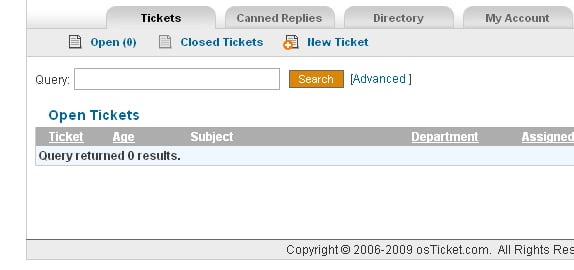
For some reason it was decided that if there are no open tickets then the ticket page should list all the Answered Tickets and then if there are none of those it should show all Closed tickets. This is highly confusing for everyone and we’re going to show you how to make it always show the Open Tickets page even when there are no open tickets.

scp/tickets.php

if($stats['open'])
 $nav->addSubMenu(array('desc'=>'Open ('.$stats['open'].')','title'=>'Open Tickets', 'href'=>'tickets.php', 'iconclass'=>'Ticket'));

Essentially we want to get rid of the "if" statement and say to always show the “Open page” title/nav. So just modify it to look something like this:

// We don't want an if (there are tickets) we always want the open page up/available.
//    if($stats['open'])
$nav->addSubMenu(array('desc'=>'Open ('.$stats['open'].')','title'=>'Open Tickets', 'href'=>'tickets.php', 'iconclass'=>'Ticket'));

Then remove or comment out the following so that we’ll always see the Open ticket page even if there are 0 open tickets:
include/staff/tickets.inc.php

       }elseif(!$stats['answered']) { //no open or answered tickets (+-queue?) - show closed tickets.???
 $status='closed';
 $results_type='Closed Tickets';
ajax loader
Tagged mod, modification, ticket
SHARE THIS Twitter Facebook Delicious StumbleUpon E-mail

osTicket > Transfer/Assign with no comment

Oct26
2010
Leave a Comment Written by Scott Rowley

Today we are going to show you how to get rid of the annoying requirement of adding a comment to a ticket transfer or assignment…

For the “Assign to Staff” section you can comment out the following line from

scp/tickets.php

$fields['assign_message']   = array('type'=>'text',  'required'=>1, 'error'=>'Message required');

like so:

//$fields['assign_message']   = array('type'=>'text',  'required'=>1, 'error'=>'Message required');

For assign to department you’ll need:
scp/tickets.php

$fields['message']      = array('type'=>'text',  'required'=>1, 'error'=>'Note/Message required');

Like so:

//$fields['message']      = array('type'=>'text',  'required'=>1, 'error'=>'Note/Message required');

Then if you want to let people know that it is not required you can go into

include/staff/viewticket.inc.php
Find (for assign to staff):

<span >Comments/message for assignee.  (<i>Saved as internal note</i>)
 <font class='error'> *<?=$errors['assign_message']?></font></span>

And remove:

<font class='error'> *<?=$errors['assign_message']?></font>

Find (for department transfer):

<span >Comments/Reasons for the transfer.  (<i>Internal note</i>)
 <font class='error'> *<?=$errors['message']?></font></span>

Remove:

<font class='error'> *<?=$errors['message']?></font>

Now comments are no longer required to be present before assigning or transferring a ticket – and users are aware that it is not required.

ajax loader
Tagged assign, comment, mod, modification, ticket, transfer
SHARE THIS Twitter Facebook Delicious StumbleUpon E-mail

osTicket > Mass ‘Ban & Delete’

Oct26
2010
Leave a Comment Written by Scott Rowley

Ok, people…careful with this one!

This is for if you would like to allow for mass ban & delete from the Tickets tab.
First you need to add a new button to the main page.

include/staff/tickets.inc.php

<input class="button" type="submit" name="banDelete" value="Ban & Delete"
                        onClick=' return confirm("Are you ABSOLUTLEY CERTAIN this was spam?");'>

Then we need to add the functionality. Its easier here to replace a larger chunk so…

scp/tickets.php
Replace

if(!$errors) {
                    $count=count($_POST['tids']);
                    if(isset($_POST['reopen'])){
                        $i=0;
                        foreach($_POST['tids'] as $k=>$v) {
                            $t = new Ticket($v);
                            if($t && @$t->reopen()) $i++;
                        }
                        $msg="$i of $count selected tickets reopened";
                    }elseif(isset($_POST['close'])){
                        $i=0;
                        foreach($_POST['tids'] as $k=>$v) {
                            $t = new Ticket($v);
                            if($t && @$t->close()) $i++;
                        }
                        $msg="$i of $count selected tickets closed";
                    }elseif(isset($_POST['overdue'])){
                        $i=0;
                        foreach($_POST['tids'] as $k=>$v) {
                            $t = new Ticket($v);
                            if($t && !$t->isoverdue())
                                if($t->markOverdue()) $i++;
                        }
                        $msg="$i of $count selected tickets marked overdue";
                    }elseif(isset($_POST['delete'])){
                        $i=0;
                        foreach($_POST['tids'] as $k=>$v) {
                            $t = new Ticket($v);
                            if($t && @$t->delete()) $i++;
                        }
                        $msg="$i of $count selected tickets deleted";
                    }
                }
                break;

With

if(!$errors) {
                    $count=count($_POST['tids']);
                    if(isset($_POST['reopen'])){
                        $i=0;
                        foreach($_POST['tids'] as $k=>$v) {
                            $t = new Ticket($v);
                            if($t && @$t->reopen()) $i++;
                        }
                        $msg="$i of $count selected tickets reopened";
                    }elseif(isset($_POST['close'])){
                        $i=0;
                        foreach($_POST['tids'] as $k=>$v) {
                            $t = new Ticket($v);
                            if($t && @$t->close()) $i++;
                        }
                        $msg="$i of $count selected tickets closed";
                    }elseif(isset($_POST['overdue'])){
                        $i=0;
                        foreach($_POST['tids'] as $k=>$v) {
                            $t = new Ticket($v);
                            if($t && !$t->isoverdue())
                                if($t->markOverdue()) $i++;
                        }
                        $msg="$i of $count selected tickets marked overdue";
                    }elseif(isset($_POST['delete'])){
                        $i=0;
                        foreach($_POST['tids'] as $k=>$v) {
                            $t = new Ticket($v);
                            if($t && @$t->delete()) $i++;
                        }
                        $msg="$i of $count selected tickets deleted";
                    } // NOW MY CODE
                    elseif(isset($_POST['banDelete'])){
                        $i=0;
                        foreach($_POST['tids'] as $k=>$v)
                         {
                            $t = new Ticket($v);
                            if($t && @$t->delete())
                            {
                            if($beenBanned=$t->getEmail()){
                            if(Banlist::add($t->getEmail(),$thisuser->getName())){}
                            $msg .= "$beenBanned banned!<br />";}
                            $i++;
                            }
                         }
                    $msg .= "$i of $count selected tickets deleted <br />$i of $count emails banned.";
                    }}
                break;

All of your effected tickets will now be deleted and the emails banned. You will also be alerted to the result so you can double check your email addresses and unban if necessary.

ajax loader
Tagged ban, delete, mass, mod, modification, ticket
SHARE THIS Twitter Facebook Delicious StumbleUpon E-mail

osTicket > Allow clients to assign department

Oct26
2010
4 Comments Written by Scott Rowley

This is the MOD for the much requested “Allow user to select department”…

Open $TICKETS_HOME/open.php
Remove

$_POST['deptId']=

(only this, not the rest of the line)

Open $TICKETS_HOME/include/client/open.inc.php
Before the Subject
insert the following:

<td align="left"><b>Department:</b></td>
        <td>
            <select name="deptId">
                <option value="" selected >Select Department</option>
                <?
                 $services= db_query('SELECT dept_id,dept_name FROM '.DEPT_TABLE.' ORDER BY dept_name');
                 while (list($deptId,$dept) = db_fetch_row($services)){
                    $selected = ($info['deptId']==$deptId)?'selected':''; ?>
                    <option value="<?=$deptId?>"<?=$selected?>><?=$dept?></option>
                <?
                 }?>
            </select>
            &nbsp;<font class="error"><b>*</b>&nbsp;<?=$errors['deptId']?></font>
        </td>
    </tr>
ajax loader
Tagged department, mod, modification, ticket
SHARE THIS Twitter Facebook Delicious StumbleUpon E-mail
Newer Entries »

Be Heard!

Authors needed! Feel like sharing your tech wisdom with the world? We are looking to expand our writer base and would love to hear from you. We need articles on any relevant technology/software/media/howto/etc (Well...lets at least hold to the legal stuff ;)

Just email scott (at) sudobash (dot) net

Corrections? Questions? Comments?

Find an error?
Everything work out great for you?
Have some feedback?
Like to see something added to the article?

PLEASE leave us a comment after the article and let us know how we are doing, or if something needs corrected, improved or clarified.

Thank you!
- The Management

Sudo Bash Member sites

Des Moines, Iowa Karate Classes
Iowa MMA Tournaments
Iowa SAR
Ooo-er
5point Studios Tattoo & Piercing

Meta

  • Log in
  • Entries RSS
  • Comments RSS
  • WordPress.org

RSS HowToGeek

  • Week in Geek: Aero Glass Feature will be Removed from Windows 8
  • How to Speed Up Web Browsing with Search & Bookmark Keywords
  • Geek Trivia: Pagers Were First Developed To Assist Which Professionals?
  • The Best Tips and Tricks for Using Email Efficiently
  • Desktop Fun: Starry Skies Wallpaper Collection Series 2

RSS TheGeekStuff

  • UNIX / Linux Processes: C fork() Function
  • How to Calculate IP Header Checksum (With an Example)
  • How to Encrypt Your Bash Shell Script on Linux Using SHC
  • Intro to DOCSIS Architecture, CM CMTS Protocol for Cable Modems
  • Ettercap Tutorial: DNS Spoofing & ARP Poisoning Examples

RSS LifeHacker

  • DIY Maple-Flavored Pancake Syrup [Breakfast]
  • This Week's Top Downloads [Download Roundup]
  • Make Mini Dutch Baby Pancakes in a Muffin Tin [Breakfast]
  • Pour Vinegar Down Your Drain Every Three Months to Keep Clogs Away [Video]
  • Use the Jelly Pocket Method for a Better Drip-Free PB&J [Food Hacks]

EvoLve theme by Blogatize  •  Powered by WordPress Sudo Bash
By Geeks - For Geeks

Back to Top