
 Written by
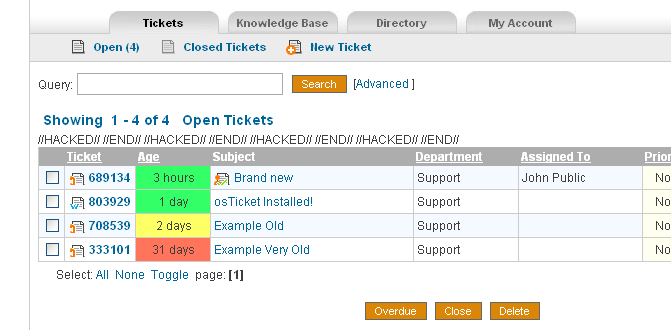
 "Assigned To" is a variation on webpragmatists original "Assigned To" MOD as seen on the osTicket forum.
"Age of Tickets" is sudobash.net original coding
include/staff/tickets.inc.php
Remember to comment out the original sortOptions
//I admit this crap sucks…but who cares??
$sortOptions=array('date'=>'ticket.created','ID'=> 'ticketID','pri'=>'priority_urgency','dept'=>'dept_name','ass'=>'firstname','timeopen'=>'timeopen');
//$sortOptions=array('date'=>'ticket.created','ID'=>'ticketID','pri'=>'priority_urgency','dept'=>'dept_name');
Remember to comment out the first entry for $qselect and $qfrom
$qselect = 'SELECT DISTINCT ticket.ticket_id,lock_id,ticketID,ticket.dept_id,ticket.staff_id,subject,name,ticket.email,dept_name,staff.firstname,staff.lastname '.',ticket.status,ticket.source,isoverdue,ticket.created,pri.*,CASE WHEN status = "open" THEN FLOOR(TIME_TO_SEC(TIMEDIFF(now(),ticket.created))/60) ELSE FLOOR(TIME_TO_SEC(TIMEDIFF(ticket.closed,ticket.created))/60) END AS timeopen,count(attach.attach_id) as attachments ';
$qfrom=' FROM '.TICKET_TABLE.' ticket LEFT JOIN '.DEPT_TABLE.' dept ON ticket.dept_id=dept.dept_id '.
' LEFT JOIN '.STAFF_TABLE.' staff ON ticket.staff_id=staff.staff_id';
Place this with the other table headers (wherever you want it to show up in the table)
<th width="150" ><a href="tickets.php?sort=ass&order=" title="Sort By Assignee ">Assigned To</a></th>
And again for the Age column
<a href="tickets.php?sort=timeopen&order=<?=$negorder?><?=$qstr?>" title="Sort By Age <?=$negorder?>">Age</a></th>
New Code! This fixed the issue with the >35 days (50339 MySQL time issue).
<!--<td align="center" nowrap><?=Format::db_date($row['created'])?></td>-->
<?
$ticket_id=$row['ticket_id'];
$sql = mysql_query("SELECT UNIX_TIMESTAMP(created) FROM ost_ticket WHERE ticket_id=$ticket_id");
$created_row = mysql_fetch_array($sql);
$created = $created_row['UNIX_TIMESTAMP(created)'];
// closed ticket correct age
if ($status=='closed')
{
// closed ticket
$sql = mysql_query("SELECT UNIX_TIMESTAMP(closed) FROM ost_ticket WHERE ticket_id=$ticket_id");
$closed_row = mysql_fetch_array($sql);
$closed = $closed_row['UNIX_TIMESTAMP(closed)'];
$diff = $closed - $created;
}
else
{
$now=date(U);
$diff = $now - $created;
}
?>
<td class="nohover" align="center" style="color:<?$color="#33FF66"; $old = round($diff / 86400); if ($old >= 4){$color="red"; print ($color);} ?> ">
<?
$diff = round($diff / 60);
$min = "min";
$mins = "mins";
$hours = "hours";
$hour = "hour";
$day = "day";
$days = "days";
if ( $diff <= 1 ){
print ($diff . " " . $min);
}elseif ( $diff > 1 && $diff <= 59 ){
print ($diff . " " . $mins);
}elseif ( $diff >= 60 && $diff <= 119 ){
$diff = round($diff / 60);
print (1 . " " . $hour);
}elseif ( $diff >= 120 && $diff <= 1439 ){
$diff = round($diff / 60);
print ($diff . " " . $hours);
}elseif ( $diff >= 1440 && $diff <= 2879 ){
print (1 . " " . $day);
}elseif ( $diff >= 2880 ){
$diff = round($diff / 1440);
print ($diff . " " . $days);
}else {};
?>
</td>
<td nowrap><?=($row['firstname']) ? $row['firstname'] : ' ';?> <?=($row['lastname']) ? $row['lastname'] : '';?></td>
Also make sure to comment out your "Date" — you won’t need it now that you know the Age.
You should now be able to refresh your Ticket page and have a nice "Assigned To" column along with the "Age of Tickets" column.
Now you may notice that after you close a ticket that is assigned to someone that assignment gets removed. I have found this undesirable so we’ll edit the following
include/class.ticket.php
remove staff_id=0 from the following line:
$sql= 'UPDATE '.TICKET_TABLE.' SET status='.db_input('closed').',isoverdue=0,duedate="NULL",updated=NOW(),closed=NOW() '.
This will still make the ticket show up under "My Tickets" in order to get it to stop doing that (if you desire), then change the following entry from:
include/staff/tickets.inc.php
$qwhere.=' AND ticket.staff_id='.db_input($staffId);
to:
$qwhere.=' AND ticket.status="open" AND ticket.staff_id='.db_input($staffId);
You’ll also need to change the following (otherwise it will count that you have tickets assigned but won’t list them thus confusing everyone).
scp/tickets.php
'LEFT JOIN '.TICKET_TABLE.' assigned ON assigned.ticket_id=ticket.ticket_id AND assigned.staff_id='.db_input($thisuser->getId());
To:
'LEFT JOIN '.TICKET_TABLE.' assigned ON assigned.ticket_id=ticket.ticket_id AND open.status="Open" AND assigned.staff_id='.db_input($thisuser->getId());
this is a great mod packaged together nicely. i have one problem, after completing the mod it doesn’t show a border on the left of the age column….not a big issue just kind of an eyesore. i went with the no color option but even tried the color option with the same results. Thanks for putting this together
Hmm, haven’t run into that problem. Have you modified your CSS at all prior to this? I suppose if nothing else you could alter the style of that particular section. Glad its working for you otherwise though!
I figured out it was just chrome not ‘showing’ the border to the left. No problems now. Now i am trying to get the total time on a project to be a column at the end with use of the time mod
Are you able to post the edited files?
I’m having problems implementing these both at the same time on 1.6ST
I get as far as the headers being shown and the age and colour showing but the assigned staff member fields are not there and everything is offset from the header.
Thanks
I don’t have the files prepared with these MODs alone as I have several other MODs in place as well, however, if you’d like you can email me the files and I can take a look and fix them for you. Scott (at) sudobash (dot) net.
Man your scripts are amazing, it’s helped so much.
Awesome, thanks very much 🙂
I’ve got a crazy request…can the age be represented differently on the closed tickets, say the time in days it took to resolve the issue instead of just the original age of the ticket? If you did this, it would be greatly appreciated
If I get some time I’ll see about adding this. 🙂
I played around with it a bit today….if we were to put an IF statement regarding ?status=closed before it writes the AGE column and have a different formula/SQL statement for the age column it could be done with closed MINUS created fields right? Just not sure how to do it SQL wise 🙂
made my own little workaround.
in the headers for the main tickets view I put this in place of AGE
$action = $_GET[‘status’];
if ($action == ”){
?>Age
Resolution
And I changed it to be the difference of closed and created to get a figure and used similar IF statement above to plug it in if on the Closed ticket view.
May be clunky, but it works for me 🙂
Something to take into account is if a ticket has been reopened. If its been reopened it still has a “Closed” date stamp. Not sure if you solution needs to worry about that or not but I remember bumping into that at one point.
Not really an issue for me….it changes the view so if it is open it doesnt show resolution, it shows age. unless I am missing something here 🙂
I may be missing something. I have everything working perfectly except I dont see the code to add to make the Assigned To column actually work. I see the code to add the header for Assigned to. And I have added that fine. I have also added the Header for Age. And added the code for the Color for Age and that works fine.
But I dont see any code to add to the lower part of the table to pull the Assigned to info. Where do I find this at?
Thanks
Never mind. I found the code on the other thread.
But it is missing from this thread. Here is the missing code:
Sorry about that, I’ve added it in from the other post.
Thanks Scott,
I have added several of your mods tonight and I am very impressed with your code. The reports are awsome. Keep up the great work.
Derek
Hello,
Thanks for these great mods!
In order to get the ‘My Tickets’ count to show up properly, I had to use this line in \scp\tickets.php:
‘LEFT JOIN ‘.TICKET_TABLE.’ assigned ON assigned.ticket_id=ticket.ticket_id AND assigned.status=\’open\’ AND assigned.staff_id=’.db_input($thisuser->getId());
Hey, Thanks for the great mods!
I have been having a problem with this one though.
Every time I try to add the last part of this mod in scp/tickets.php
‘LEFT JOIN ‘.TICKET_TABLE.’ assigned ON assigned.ticket_id=ticket.ticket_id AND open.status=’Open’ AND assigned.staff_id=’.db_input($thisuser->getId());
I get the following error
“Parse error: syntax error, unexpected T_STRING in /home/matheson/public_html/osticket/scp/tickets.php on line 442”
Yep, just ran into that myself. Sorry for the issue. I have updated the code to use “Open” instead of ‘Open’ as it was breaking outside of the variable.
Nevermind,
I think its working now when I changed the line to
‘LEFT JOIN ‘.TICKET_TABLE.’ assigned ON assigned.ticket_id=ticket.ticket_id AND assigned.status=\’open\’ AND assigned.staff_id=’.db_input($thisuser->getId());
Thanks again for a great mod!
Thanks for this MOD.
just one question…in the age column, the colors aren’t working, can u help me?
What’s happening instead? Is code outputting or are the colors simply not showing up?
i have problems with this line
<td class="nohover" align="center" style="color:= 4){$color=”red”; print ($color);} ?> “>
the colors aren’t showing
Hi,
Thanks for the mod.
I have an issue: in the Age column every ticket shows 15648 days.
I’m using w2k8..
I also implemented Reports and it’s great 🙂
Thanks,
Alon
Hi, in your sql sentences check the prefix for the tables
$sql = mysql_query("SELECT UNIX_TIMESTAMP(closed) FROM ost_ticket .....if you rename the tables with other prefix you need to change here with that prefix.
I solved with that.
Regards.
Scott –
Great mod. I actually ended up ditching Ticket Age, but I used what I learned here to include a couple of other columns. The first was “Last Response” which was easy enough. It was primarily to make sure that our staff was keeping constant communication with customers regardless of ticket age (we’re not measured on time-to-closure).
The second, which was a big hit with the group was “Message Age.” First we check to see if the Last Message came in after the Last Response .. if so, then show Last Message age highlighted. Provides an immediately actionable dashboard. Let me know if you’d be interested in possibly cleaning up the code and publishing.
Can you send me this mod I want to use last response and message age as well.
Thank you
Jon
I am using 1.6 RC5 — When I implament this mod the priority header goes missing but the column is still there. Can you just send me the full new moded tickets.inc.php file?